
As soon as a page is loaded a website can see your IP. This IP can identify your internet service provider and approximately where you are in a city. This IP number is also shared across all websites you visit. In 2026 there are more solutions to hiding this IP than at any point in the past. However, upon closer inspection many of these solutions only provide partial hiding across a users online activities.
What does hiding your IP address actually do?
IP hiding involves routing internet traffic via an intermediary server enroute to a specific destination on the internet. The receiving end will use the IP address of the intermediary server instead of the user's IP address supplied by their internet service provider. The receiving end will not be able to determine the user's location or link any behaviour to the user's connection to their home. IP hiding does not, however, make the user invisible. The user's IP address will be visible to intermediate servers. User logins and cookies will also identify the user.
9 ways to hide your IP address, checked
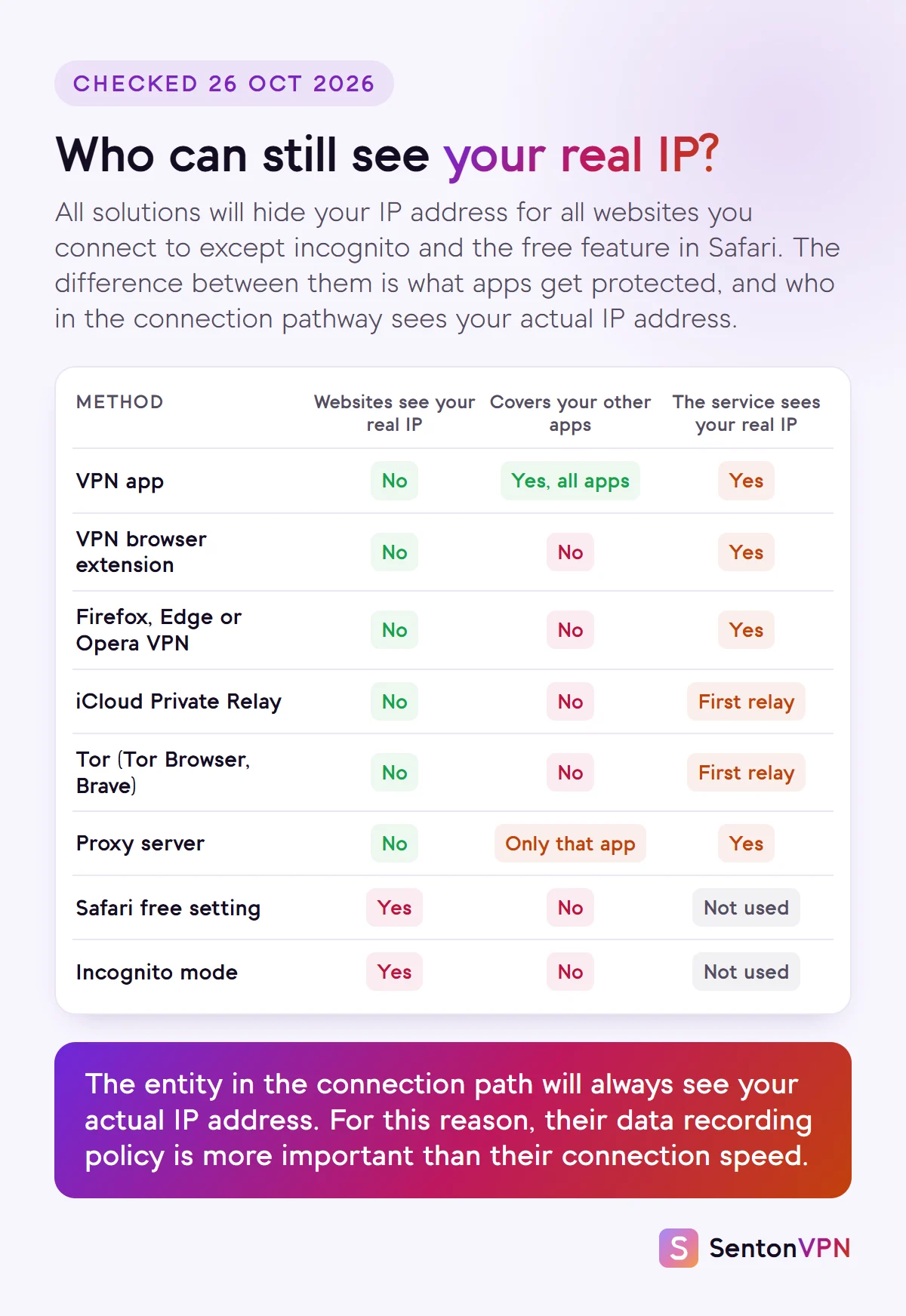
On 26 October 2026 we evaluated nine commonly available IP hiding techniques as advertised by the manufacturer in their product information. For each technique we then attempted to determine who can view the user's real IP address, which user traffic is impacted and any restrictions. We identified two pieces of information. Google has discontinued Chrome's IP Protection for Incognito in October 2025 and Firefox now features an inbuilt free VPN.
- Hides your IP from websites
- Yes
- Covers
- Every app on the device
- Cost
- Paid, often with a free trial
- The catch
- You trust the VPN company with your real IP
- Hides your IP from websites
- Yes
- Covers
- That browser only
- Cost
- Paid or free
- The catch
- Other apps still use your real IP
- Hides your IP from websites
- Yes
- Covers
- Firefox only
- Cost
- Free, 50 GB a month
- The catch
- Needs a Mozilla account, staged rollout
- Hides your IP from websites
- Yes
- Covers
- Edge only
- Cost
- Free, 5 GB a month
- The catch
- Personal Microsoft account, not every region
- Hides your IP from websites
- Yes
- Covers
- Opera only
- Cost
- Free
- The catch
- A browser proxy, not a device VPN
- Hides your IP from websites
- Yes
- Covers
- Safari only
- Cost
- iCloud+ subscription
- The catch
- Not other apps, some networks block it
- Hides your IP from websites
- From known trackers only
- Covers
- Safari only
- Cost
- Free
- The catch
- The sites you visit still see your IP
- Hides your IP from websites
- Yes
- Covers
- That browser only
- Cost
- Free
- The catch
- Slow, more CAPTCHAs, sites can tell it is Tor
- Hides your IP from websites
- Yes, for proxied traffic
- Covers
- The app you set it in
- Cost
- Free or paid
- The catch
- Often no encryption, the operator sees your traffic
| Method | Hides your IP from websites | Covers | Cost | The catch |
|---|---|---|---|---|
| VPN app | Yes | Every app on the device | Paid, often with a free trial | You trust the VPN company with your real IP |
| VPN browser extension | Yes | That browser only | Paid or free | Other apps still use your real IP |
| Firefox built-in VPN | Yes | Firefox only | Free, 50 GB a month | Needs a Mozilla account, staged rollout |
| Edge Secure Network | Yes | Edge only | Free, 5 GB a month | Personal Microsoft account, not every region |
| Opera's free VPN | Yes | Opera only | Free | A browser proxy, not a device VPN |
| iCloud Private Relay | Yes | Safari only | iCloud+ subscription | Not other apps, some networks block it |
| Safari "Hide IP Address" (free) | From known trackers only | Safari only | Free | The sites you visit still see your IP |
| Tor (Tor Browser, Brave's Tor window) | Yes | That browser only | Free | Slow, more CAPTCHAs, sites can tell it is Tor |
| Proxy server | Yes, for proxied traffic | The app you set it in | Free or paid | Often no encryption, the operator sees your traffic |
Hide your IP address on every app with a VPN
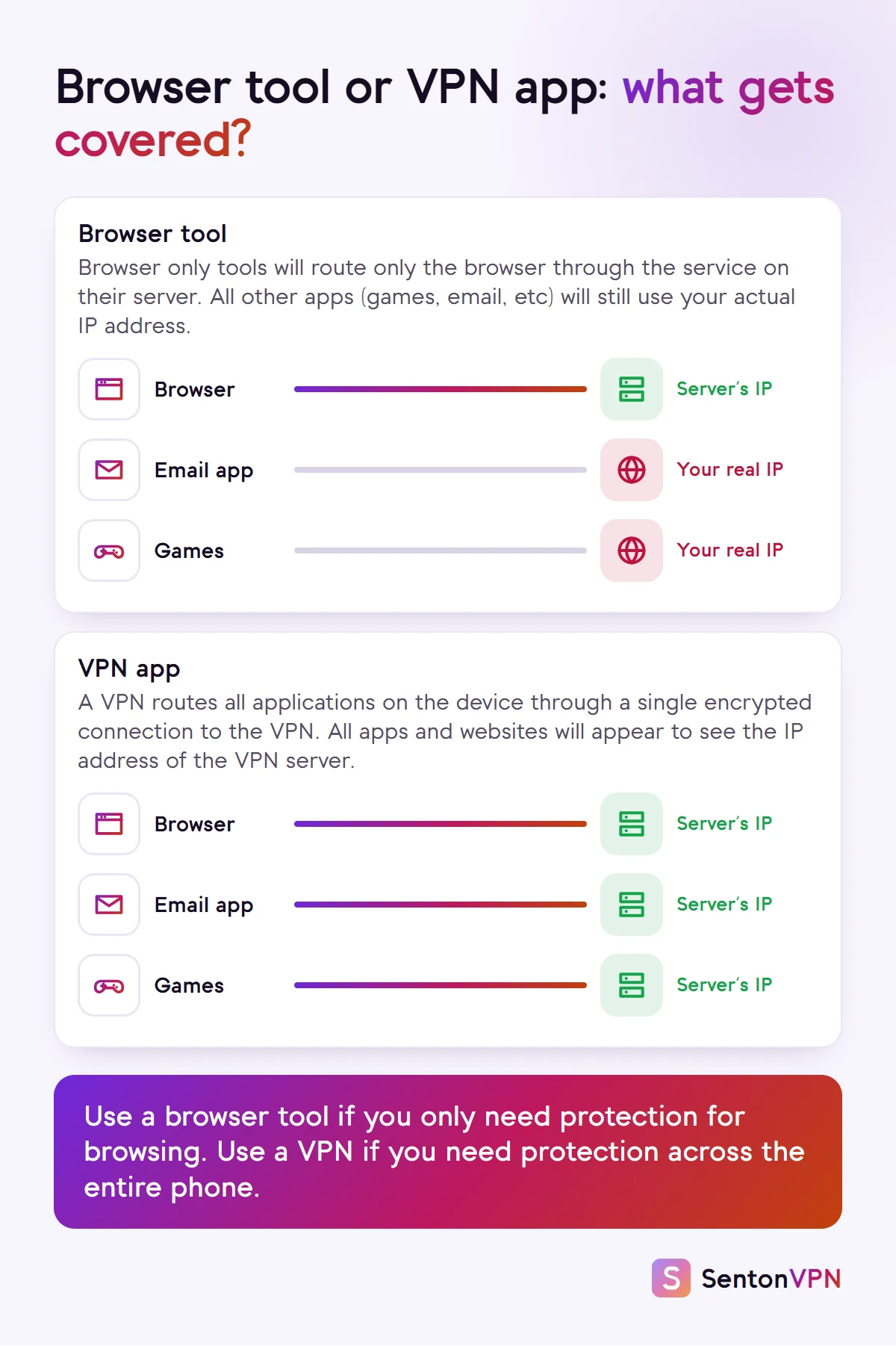
The only app on our list that supports phone coverage is a VPN app. All data from your mobile goes through an encrypted tunnel to a VPN server. Any game, app or website will see the IP address of that server. Your internet provider will know you are using a VPN but not the websites within the VPN. As such it's also important to get a reputable service.

- 1Download the appSenton VPN is available on Google Play for Android and supports all of the phone. Our browser extensions for Chrome, Firefox, Edge and Brave only work in that particular browser. We are also currently working on an app for iPhone and iPad.
- 2Pick a server locationChoose by country based on speed, or by the country you need an IP address from. For more on how to switch server location when using a VPN see our article here.
- 3Ensure the Kill Switch is turned onThis will help prevent your real IP address from being exposed when your connection is dropped as it will stop supported data from passing through when there is no connection.
- 4Check your connection has been successfulCheck out our What is my IP page both with and without a VPN connection. You will notice a difference in IP and city.

How to hide your IP address on iPhone
Safari has two levels of IP privacy. On the free level, your IP is hidden from trackers (e.g. ad code) that are known to track IP addresses, but the websites you visit can see your IP. On the paid level you need iCloud+ and Private Relay and your IP is hidden from the websites you visit. This only applies to Safari. Other apps will use your real IP address unless you are using a VPN.

- 1Open the settingTo set this up go to Settings > Apps > Safari and tap Hide IP Address.
- 2Pick the levelFor users with iCloud+ select Trackers and Websites. For all other users select Trackers Only.
- 3Check Private RelayIf you have a paid iCloud+ account iCloud Private Relay must be enabled in Settings > iCloud, under your name.
- 4If a site breaksYou can choose to allow one site to see your IP address. This can be useful if a site suddenly becomes unresponsive. To do this tap the settings icon on the page within the address bar and choose Show IP Address.
How to hide your IP address on Android
Android does not allow you to hide your IP address from websites. You need a service for this. A VPN service protects all apps on Android. Tor Browser for Android will hide your IP address inside Tor Browser. Page load times will be slower. Using mobile data offers no protection. A new IP will be assigned but your mobile network will know who you are.
- 1Install a VPN appDownload a VPN app like Senton VPN from Google Play.
- 2ConnectOnce installed log in and connect to a server.
- 3Allow the VPNFor the first time Android will ask permission to use a VPN. Click OK.
- 4Turn on the Kill SwitchTurn on the Kill Switch and check your IP address on the What is my IP page.
How to hide your IP in Chrome, Safari, Firefox and Edge
Privacy is available through all the major browsers to some degree. The implementation of this feature varies. Below you can see what is built into the browsers in October 2026 and what is provided by the user.
Chrome
Chrome provides no protection from websites using your IP address. Google once had IP Protection in Incognito browsing but deleted this in October 2025. Chrome users can use an extension that provides a VPN.
Safari
Safari provides protection from known trackers without charge. If using iCloud+ Private Relay then your IP address is also hidden from websites.
Firefox
Firefox has a free VPN built in in segments since Firefox 149. 50 GB is provided per month. A Mozilla account is needed and this service is only provided for Firefox.
Edge
Edge provides Secure Network which provides 5 GB per month if a user signs in with their personal Microsoft account. This is not available in all countries and is not available on work-managed devices.
Brave
Brave provides the ability to use a Private Window over Tor. All activity in this window will go through the Tor network and websites will not be able to see your IP address. However Brave does not provide the same level of protection as the Tor Browser.
Opera
Opera has a free browser proxy that seems to be a VPN. There is no data limit and this service is only provided for Opera.
Things that do not hide your IP address
There are many online articles that suggest you can hide your IP address using some sort of privacy feature. In this article we will look at the 4 most common privacy features that do not hide your IP address.
What hiding your IP will not do
Masking your IP removes one piece of information from the puzzle. After researching the nine techniques used to mask an IP we found that there were consistently five issues that apply to all techniques. Here they are before they catch you out.
- 1.Logins still identify youWhen you sign inAuthentication reveals your identity. Regardless of the IP you connect from, Google, Instagram and your bank will identify you the moment you authenticate.
- 2.Cookies and fingerprintingOn any browserFingerprinting and cookies remain active across all the browsers we looked at and can still identify your browser.
- 3.More CAPTCHAs and blocksWith shared VPN or Tor addressesUsing Tor or a shared VPN means that you will encounter more CAPTCHAs and blocks from some sites as these services are more likely to be used by many people.
- 4.The service sees your real IPAlwaysThe transit service will always be aware of your actual IP address. Whether using a relay, proxy or a VPN all of these services will know your identity. Check the privacy policy of that service. We detail our privacy policy on our no-logs page.
- 5.Free tools run outFirefox 50 GB, Edge 5 GB a monthFree browser based VPNs have a data limit. Edge has a 5GB limit and Firefox has a 50GB limit per month. Once this limit has been reached the browser will revert to your real IP address.
How to check that your IP address is hidden
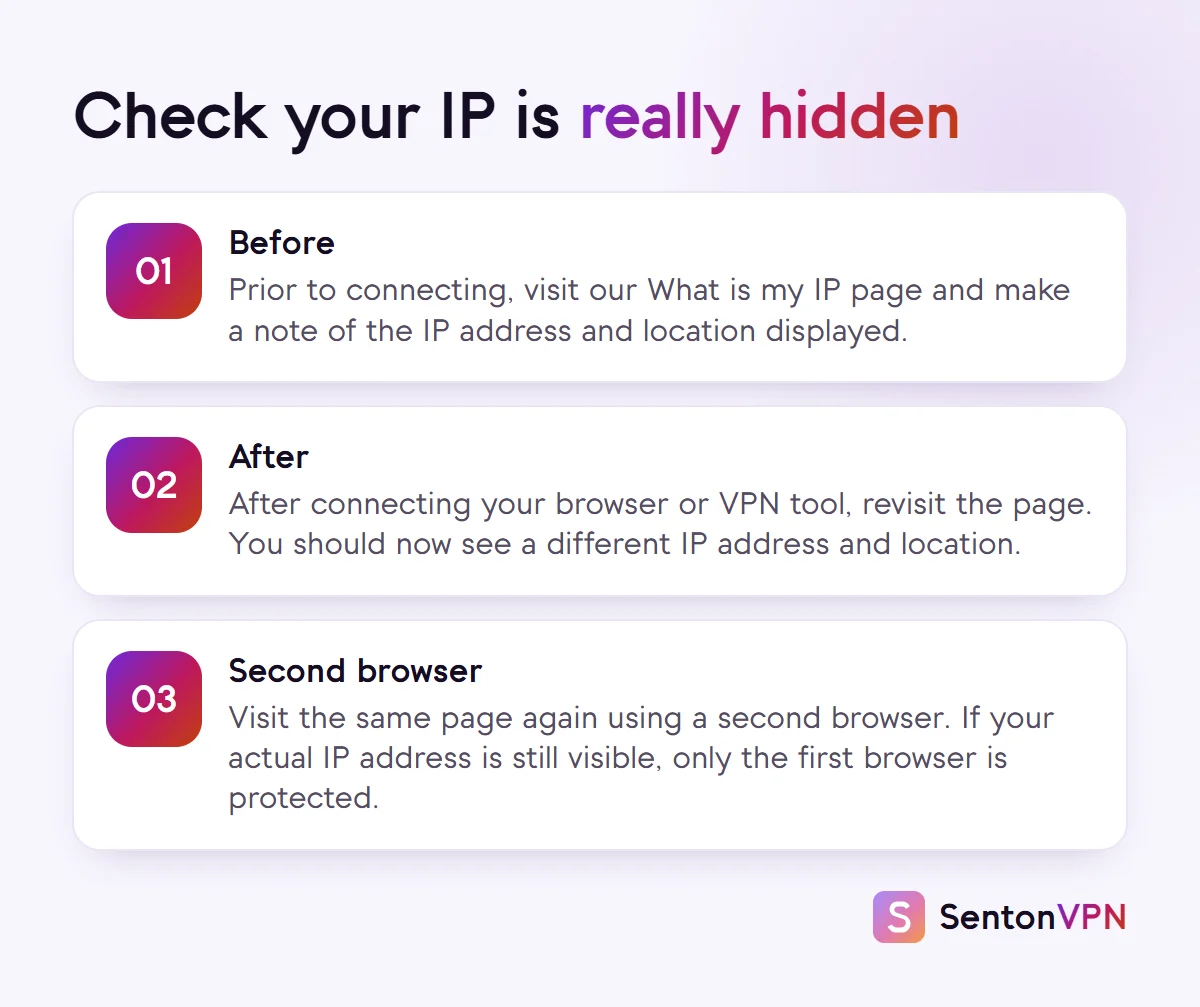
Take care. The test below can be completed in under a minute before and after using the service. It will also detect the most common IP leak issue: where one app might be hidden but other apps are not.

Before using the service check your IP address and city on our What is my IP page. While the VPN, relay or browser service is in use reload the page. Your IP address and city will now be changed. If you are using a service that only hides IP addresses in one app then reload the page in another app. Here your real IP address will be displayed.
Is it legal to hide your IP address?
Mostly yes. Hiding your IP address is part of privacy and is used by businesses daily. Some governments block or restrict the use of a VPN. Hiding your IP address does not turn an illegal activity into something that is legal. Please see our article on the legality of using a VPN for information on the status in each country.
The bottom line
- Using a VPN app will hide your IP address across all apps on your mobile phone.
- Using browser only hide services such as Firefox, Edge, Opera, Safari (with iCloud+) and browser based VPN extensions only hides your IP address within that specific browser.
- Incognito, location and private DNS do not hide your IP address.
- You can view your IP address before and after using the service.
- Logins and cookies will still recognise you.