Upon pressing play the video should appear but instead there appears a grey box stating "Sign in to confirm you're not a bot." You are not a bot, you may already be signed in and the "learn more" link on this box provides no further information. Google also has a help forum with three locked posts regarding this issue and 2,464 people have clicked "I have the same question" on these posts. No official response has been provided by YouTube for any of these posts.
What "Sign in to confirm you're not a bot" actually means
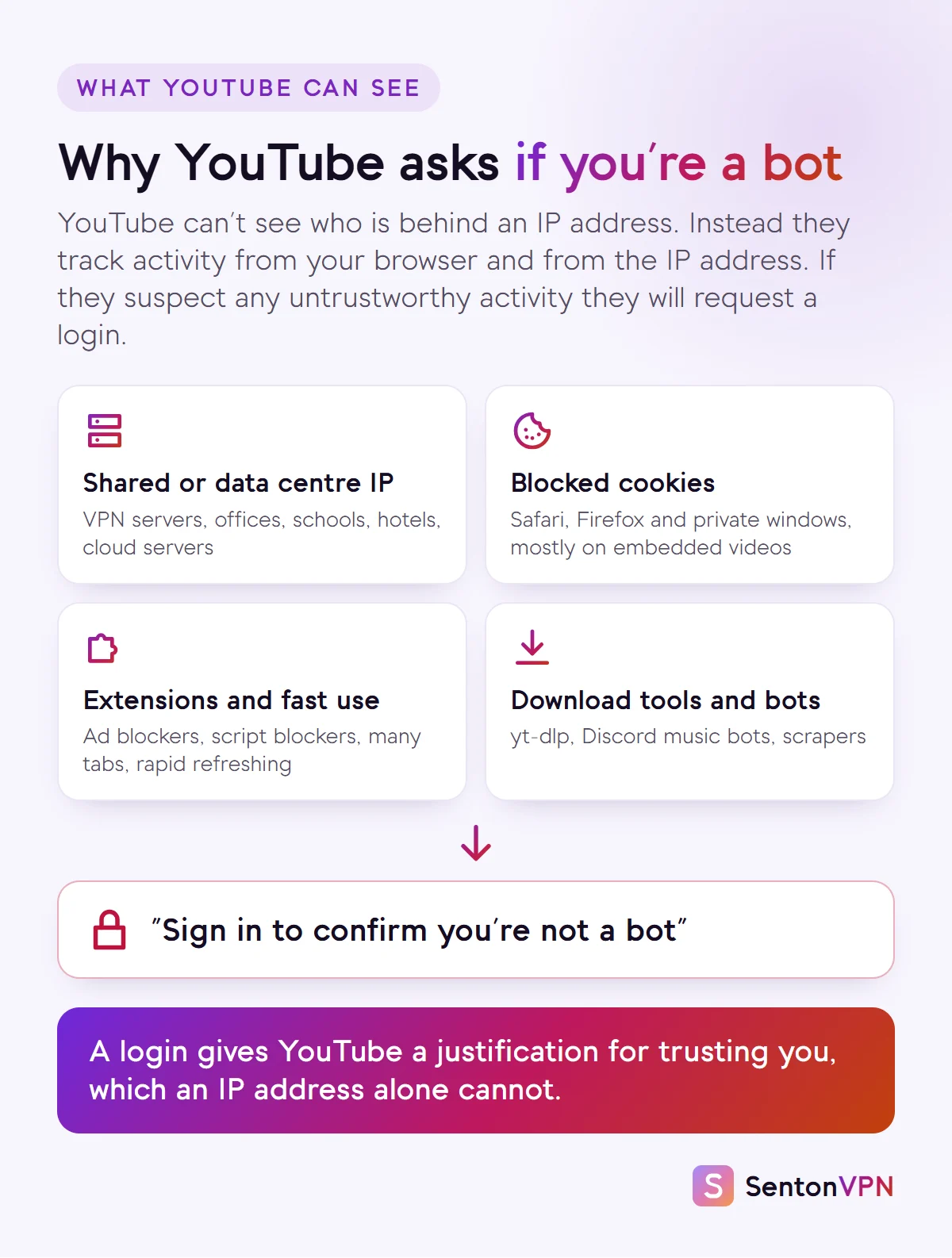
YouTube itself does not indicate what it detects. This is well and good because the list of things it detects would only be useful to the bots it aims to block. Google does release information about the rules for its search CAPTCHA (the "unusual traffic from your computer network" test). This is about as close to an official source as is available. According to the rules, the test can be triggered when automated traffic is being sent from other users on the same internet provider, the same VPN or the same network. Additionally, some tunnel and VPN services may have all of their traffic blocked, and malware on any of the computers on your network may trigger this test.
YouTube's Terms of Service provide context for the concern. Automated access to YouTube (via scrapers, robots, etc.) is not allowed except for public search engines and with advance written permission. Requiring a signed-out visitor to log in is an easy method to block automated video downloaders.
What we found in the top 13 Google results
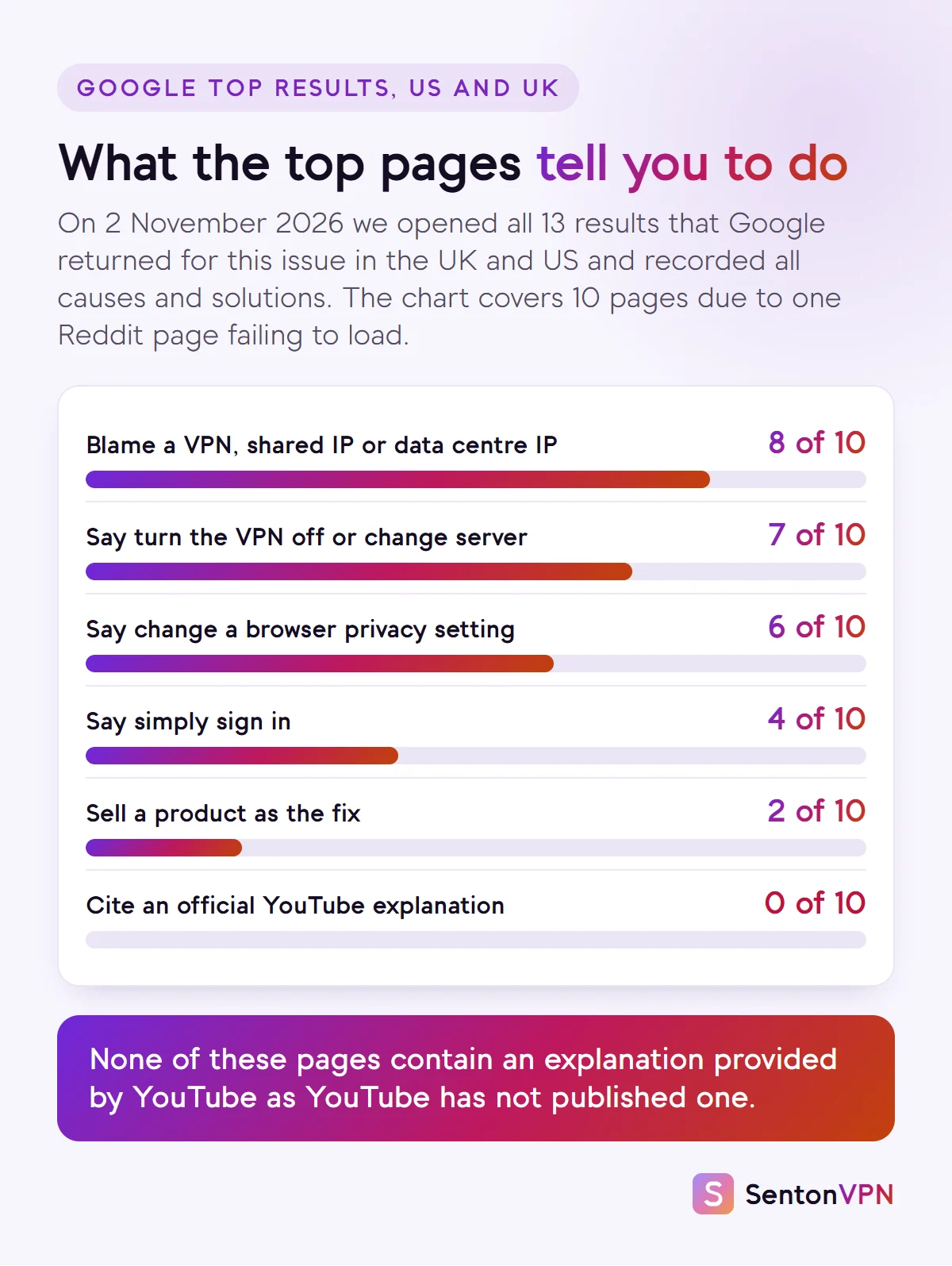
On 2 November 2026 we performed a Google search for "youtube sign in to confirm you're not a bot" in the US and UK, and "sign in to confirm you're not a bot" in the US. These searches together yielded 13 results: 11 pages and 2 YouTube videos. Each result page was visited and each reason given and solution proposed noted, as well as whether the site advertised a product or referenced YouTube. One Reddit post failed to load for us. The numbers below do not include this post. Instead they are for 10 pages.
- What it is
- Forum thread
- Blames a VPN or shared IP?
- Could not open
- Sells the fix?
- Could not open
- What it is
- Guide
- Blames a VPN or shared IP?
- Yes
- Sells the fix?
- Yes, its own proxies
- What it is
- Help article
- Blames a VPN or shared IP?
- No, says "network"
- Sells the fix?
- No
- What it is
- Forum thread
- Blames a VPN or shared IP?
- Yes (users guess)
- Sells the fix?
- No
- What it is
- Community thread
- Blames a VPN or shared IP?
- No, embeds and Safari
- Sells the fix?
- No
- What it is
- Community thread
- Blames a VPN or shared IP?
- Yes
- Sells the fix?
- No
- What it is
- Forum thread
- Blames a VPN or shared IP?
- Yes
- Sells the fix?
- No
- What it is
- Forum thread
- Blames a VPN or shared IP?
- Yes
- Sells the fix?
- No
- What it is
- Help article
- Blames a VPN or shared IP?
- Yes
- Sells the fix?
- No
- What it is
- Bug report
- Blames a VPN or shared IP?
- Yes, data centre ranges
- Sells the fix?
- No
- What it is
- Guide
- Blames a VPN or shared IP?
- Yes
- Sells the fix?
- Yes, its browser and a CAPTCHA solver
- What it is
- Video
- Blames a VPN or shared IP?
- Not counted
- Sells the fix?
- Not counted
| Result | What it is | Blames a VPN or shared IP? | Sells the fix? |
|---|---|---|---|
| Reddit, r/brave_browser | Forum thread | Could not open | Could not open |
| A proxy seller's blog | Guide | Yes | Yes, its own proxies |
| An event platform's help page | Help article | No, says "network" | No |
| A music lessons site forum | Forum thread | Yes (users guess) | No |
| Google's YouTube community, Sep 2024 | Community thread | No, embeds and Safari | No |
| Google's YouTube community, May 2025 | Community thread | Yes | No |
| A Linux distro forum | Forum thread | Yes | No |
| A language app forum | Forum thread | Yes | No |
| A music lessons site help page | Help article | Yes | No |
| A Discord music bot on GitHub | Bug report | Yes, data centre ranges | No |
| An antidetect browser's blog | Guide | Yes | Yes, its browser and a CAPTCHA solver |
| Two YouTube videos | Video | Not counted | Not counted |
What stood out
- 6 of the 11 results are community or forum posts, and 1 is a GitHub bug report. 4 of the results are written tutorials.
- 8 of the 10 results mention a data centre IP, shared IP address or a VPN as the reason for the problem and 7 of the 10 recommend switching servers or turning off the VPN. 6 of the 10 recommend adjusting a browser privacy setting (cross-site tracking in Safari, cookies, etc.) Only 4 recommend simply logging in.
- 2 of the 10 results advertise a solution. One advertises proxies while another offers a browser designed to avoid these systems and also recommends paying a service to solve the CAPTCHA tests. No results reference an official YouTube explanation because there is none.
Why YouTube thinks you're a bot: 7 common causes
There are many reasons for being blocked. We have listed them from the most common to least common. More than one reason can apply at once.
A shared IP address
If you have thousands of users sharing one IP then all their traffic will appear from that single IP however authenticated users will still be identified via their Google account. If a small number of users sharing this IP use download scripts then the IP will be flagged as automated. Some mobile networks, university and office networks, hotel networks and VPN servers all use shared IPs between many users.
A data centre IP
Many cloud and many VPN servers are hosted in data centres. In 2024 on GitHub users began reporting that YouTube began blocking entire ranges of data centre IPs. These affected cloud hosted music bots first.
Blocked or deleted cookies
YouTube uses cookies to remember that a check was performed on a user. If cookies are deleted or blocked by the browser then every new visit will be treated as a new user. This is especially relevant for embedded YouTube videos on third party sites. Chrome Incognito mode, Firefox and Safari can prevent a YouTube login from being passed to the video.
Browser extensions
Privacy, script blocking and ad blocking extensions can affect the loading of the YouTube player and make the browser appear non-standard.
Heavy or fast use
Rapidly refreshing many times, opening many videos at once or having many open YouTube tabs can be interpreted as automation.
Download tools and bots
Tools like yt-dlp, and music bots used in Discord and other scrapers are specifically targeted by the check.
Malware on your network
This is noted by Google as a reason for Google search CAPTCHA. If one device on a network performs automated actions then all other devices on the same IP may be checked.
Find the cause in three quick tests
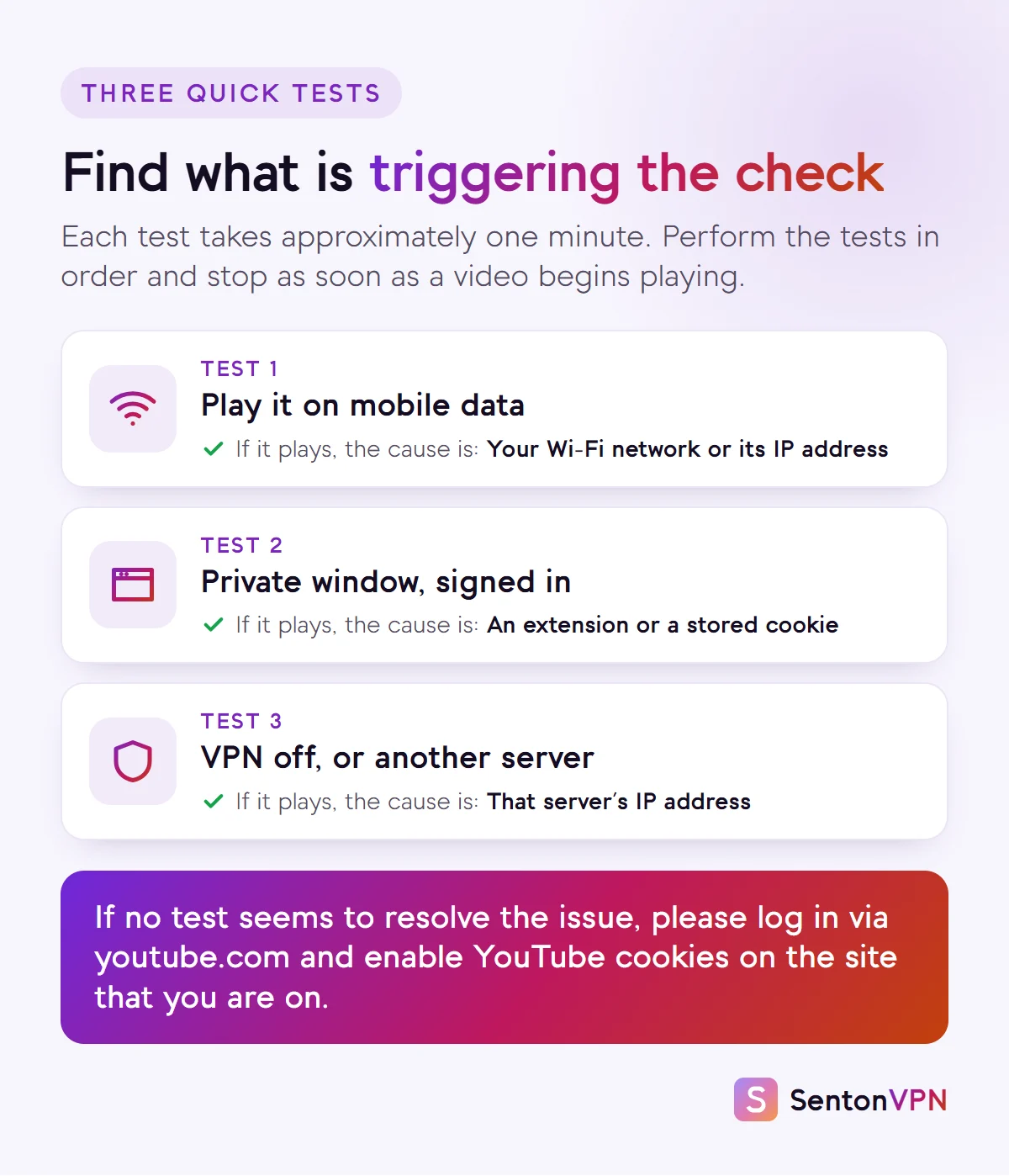
First try to identify the issue. All tests take roughly a minute.
- 1Try mobile dataTry watching the same video on mobile data instead of Wi-Fi on your phone. If this works then it is an issue with your network or IP address and not your device or your account.
- 2Try a private window, signed inTry opening the video in an Incognito or private tab and signing into youtube.com. If this works then it is most likely an issue with a cookie saved in your regular browsing profile or an extension.
- 3Turn the VPN off, or change serverIf you are using a VPN try turning it off and then trying again. Afterwards reconnect to a new location or server. If the video works on a new server or without the VPN then it is most likely due to a poor reputation of your original server or location and not you.
How to fix "Sign in to confirm you're not a bot" on a computer
- 1Sign in to YouTubeClick on the Sign in button and sign in to your Google account. For most users this will resolve the problem on youtube.com and you may only need to do this once per browser.
- 2Open the video on YouTube itselfIf the problem only occurs with videos on other sites, view that video on YouTube using the YouTube logo within the player. If this solves the problem then the problem is due to cookies on the site hosting the video.
- 3Safari: pause cross-site tracking protectionFor Mac users using Safari try turning off Prevent cross-site tracking from Safari > Settings > Privacy while viewing a video and then turning it back on. For iPhone or iPad users this can be found under Settings > Apps > Safari (Settings > Safari for iOS 17 and earlier).
- 4Firefox and Chrome: allow cookies for that siteFor Firefox users click the shield icon in the browser bar while viewing the video on the relevant webpage and turn off Enhanced Tracking Protection for that particular page only. For Chrome users click on the icon to the left of the address and go to the site settings and allow third party cookies for that site.
- 5Turn extensions off one at a timeTurn off all extensions, reload the video and then re-enable them one at a time until the message reappears. At this point you should know which extension is causing the problem.
- 6Delete only YouTube's cookiesOnly clear YouTube cookies not your entire browsing history. In Chrome go to the site settings for youtube.com and remove that site's data before signing back in.
- 7Update the browser and restart the routerUpdate your browser if there is a new version available and reboot your router, as on many home internet connections this may result in a new IP address being assigned.
How to fix it in the YouTube app and on a TV
- 1Check you are signed inIn the YouTube app, this can happen if using a shared connection or if the app is signed out. Please confirm you are signed into the correct account from within the app.
- 2Update the appPlease ensure the YouTube app is up to date on Google Play or the App Store prior to closing and then re-opening the app.
- 3Switch between Wi-Fi and mobile dataTry switching from mobile data to Wi-Fi and vice versa. This can happen when using public Wi-Fi in airports, cafes or hotels. Public Wi-Fi is often shared between many users and uses the same IP address.
- 4Smart TVs and streaming sticksWhen using the YouTube app from a streaming device or smart TV please ensure you are signed into YouTube on the TV. If your router is using a VPN and your TV is connected to it either switch to a different server available on the router or ensure the TV is not using the router's VPN.
- 5Only inside another app?If the problem only occurs from within an app (e.g. an app for a language or course) this is due to a YouTube video embedded within the app. Please watch the video within the YouTube app or ask the app developers for assistance as the embedded video player is owned by the app.
Using a VPN? What actually helps
We do provide a VPN. We can admit that a VPN may cause this message. However we cannot provide 100% assurance that a VPN will prevent this message. A VPN routes your connection through a server. This server will have an IP address shared by many users. YouTube will know what this IP address does, and if you are signed in to Google it still knows which account is watching, even through a VPN.
- 1Change serverSwitch to another server. By connecting to a server in a different country or city you will be routed through a server that has a different IP address and is performing differently than your current server. If one server produces this message take note of which servers are successful for you.
- 2Sign in while connectedIf you are using a VPN when connecting to YouTube, log into YouTube. By being logged into YouTube you are trusted more than just based on a single IP address. This may increase the chances of users with a VPN to successfully pass the check.
- 3Do not hop between serversDo not switch to a new server every few minutes. Switching to a new server could appear as a new session and could cause the check.

Static IP and Dedicated IP
We offer Static IP on eligible plans. Static IP means you receive the same IP address from your VPN on each connection (depending on availability). Static IP may help reduce some of these messages by reducing the number of IP changes that can cause these messages.
Dedicated IP is an optional paid add-on for users who would like a dedicated IP address. A Dedicated IP is not shared by any other user. This may help reduce the number of blocks and CAPTCHAs but is not a guarantee as YouTube makes the final decision. Users in areas where YouTube may be restricted but a VPN is the only option to use YouTube may benefit from static IP.
Seeing it on videos embedded in your own website
This check can occur for a YouTube embedded video in a help article, video tutorial or on a website whether or not you triggered this situation. In September 2024 a website administrator posed a question on Google Support and was answered by a volunteer YouTube Product Expert. The Product Expert indicated that this check is not configurable for website administrators and is run by YouTube.
Adding a "Watch on YouTube" link under each video may aid end users in getting past this check. In your help content instruct the end user to log into YouTube in order to get past this check. For higher priority content a self hosted video under your control may help as well.
yt-dlp, music bots and other download tools
If this check occurs in yt-dlp or a music bot or similar, you may have encountered the purpose of this check. Using such tools to download content is prohibited by YouTube's Terms of Service with the exception of cases where YouTube specifically permits such usage.
yt-dlp requests may be rejected for failing to provide a YouTube token that proves provenance. This token is provided by YouTube's BotGuard to confirm requests are being made from an actual application. Additionally, your IP address or account may be blocked as noted in the yt-dlp documentation.
We will not provide support for bypassing this check. If you are using tools to download content that you are permitted to download, do so at a low rate and do not share cookie files. This check will also continue to evolve on YouTube.
Fixes that waste your time
The bottom line
- "Sign in to confirm you're not a bot" is more likely related to the address you share rather than to you. Try signing in, testing on a different network, allowing YouTube cookies on embedded video sites and disabling extensions individually.
- If using a VPN try using a different server rather than turning off the entire service. If the bot check persists then try Static IP or Dedicated IP.
- If connecting over a public network that is accessible by others, a VPN will encrypt your network activity. The problem with this is that the IP of the server you're connected to is also shared with others. A steady address will help here.