
We've all probably used an incognito window at least once, perhaps to look something up on a friend's computer or to buy a surprise present. It has that little hat and glasses icon and a dark screen, which makes it look quite like a cloak. But it isn't one. The main function an incognito window performs is that it prevents the current browser from storing information about the session. It doesn't, however, prevent others from being able to observe your activity online. We ran our own experiment and examined the documentation for eight different browsers to find the exact limits of this functionality.
What does incognito mode do?
When you start an incognito session, a temporary session is created by the browser. This session does not have any cookies, login information or browsing history from your regular browsing sessions. Anything created in this session will be retained until the last incognito window is closed, at which point it is discarded.
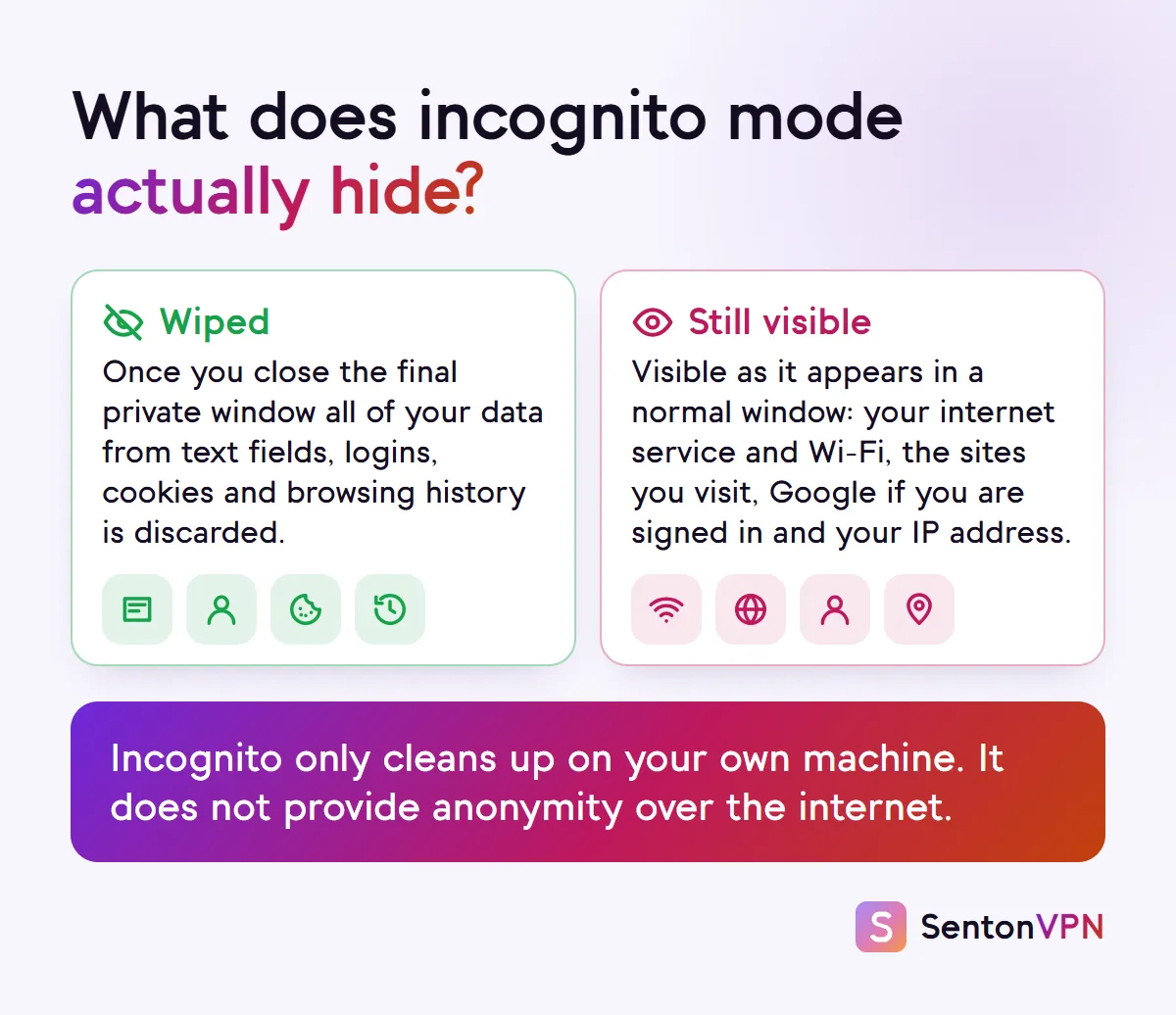
What incognito mode wipes
- Pages viewed during this session will not appear in your browsing history or address bar suggestions.
- Cookies and site data will be removed so that websites will not remember any information (such as login details or page preferences) created during this session.
- Form data entered during this session (such as search fields, addresses and names) will also be removed.
What incognito mode keeps
- Any files that are downloaded during this session will be saved in your downloads folder.
- Bookmarks added during this session will be added to your regular bookmarks.
- Anything you do while logged in to an account during this session will still be recorded by that account.
- Information recorded by websites and by your network is kept regardless of incognito usage.
What does incognito mode mean?
Incognito is simply private browsing in Chrome. Other major browsers have a similar feature, though under their own name. Firefox and Safari call it Private Browsing. Edge calls it InPrivate. And Samsung Internet calls it Secret mode. They all share the same underlying concept, just under different names, and the specific implementation varies between browsers. The source of the confusion comes from the implication of the word "incognito". It implies that you are in disguise. You only remain in disguise from others who later use the same device.
How does incognito mode work?
In Chrome, incognito is like a guest room in the browser. All cookies and data for the session are kept separate from your normal data, and all Incognito tabs and windows share the same guest room during the session. If you log into a site from one Incognito tab, you are also logged into that site from the other Incognito tabs. Safari instead isolates browsing in one private tab from browsing in another, according to Apple, which prevents sites from tracking you between private tabs. When the final private window is closed, the guest room is deleted. Your network, IP address and device remain the same, since the browser is making no changes outside of itself.
Does incognito mode actually work? We tested it
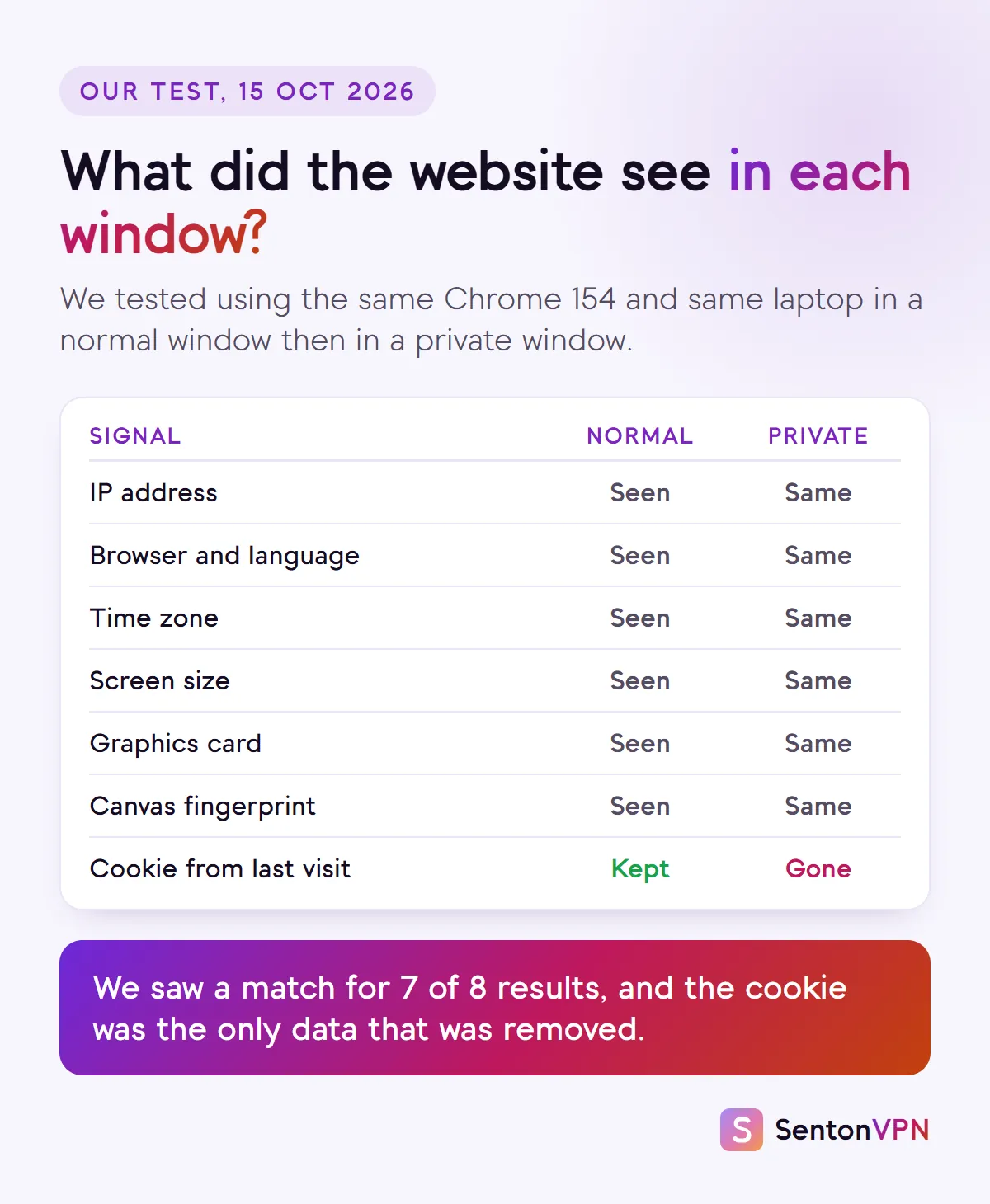
We set up our own test on 15 October 2026 using an automated copy of Chrome 154 on a Windows laptop. We checked once using a normal profile and once again using a private session. A private session works the same way as an Incognito window: it creates a throwaway session. We used a test page to discover what websites can see, and set a test cookie on a test website. Once complete for each session, we closed the browser.
7 of 8 tests showed identical values across both sessions. Language, time zone, screen resolution, graphics card, browser and IP address were identical across the two test sessions. The canvas fingerprint was also identical to the last character. The only value that was different was the cookie. During the normal session, the cookie was retained upon opening the browser again. During the private session, the cookie was not retained upon opening the browser again. For our specific test, the saved cookie was deleted with incognito, but the other 7 values were unchanged. This does not imply that incognito offers no protection against tracking. Incognito also blocks third-party cookies by default in Chrome. Additionally, each incognito session starts with an empty cookie jar, making cross-session tracking more challenging. However, device and IP information stayed the same across sessions.
Does incognito mode hide your IP address and location?
No. Incognito mode does not hide your IP address. Your IP address is what websites use to get an idea of your location. They can typically get this to the region or city level. In our test both sessions had the same IP address. If a website can access the location of your device, then this also works in private mode. Google was developing IP protection for Incognito mode but cancelled this in October 2025. Two private modes provide more by default. Safari hides your IP from known trackers (not from websites themselves unless you pay for iCloud+ Private Relay). Brave's Private Window with Tor routes your traffic through the Tor network. A VPN or similar service that routes your traffic through another server can hide your IP address no matter what browser you are using.

Who can still see what you do in incognito?
A private session only hides browsing activity from others using the same device after you. Others can still observe what they are able to access anyway.
- Websites you visit. They will be able to see your device and IP address. They can still perform tracking and fingerprinting during your session.
- Google and other accounts, if you are signed in. Signed in activity is tied to your account in the same way as any other session.
- Your network. Your internet service provider, school or employer and the administrator of your Wi-Fi network can still see the websites you visit. We have more on what your internet service provider can see and what the owner of a Wi-Fi network can see.
- Data already on the device. Malware, monitoring software or browser extensions that are permitted in a private session can still observe your activity.
Private mode, browser by browser
Private sessions are not all the same. Some browsers provide extra protections on top of the default "forget when closed" behaviour. For each browser we checked its own documentation to see what its private session provides by default.
- Wipes history and cookies on close
- Yes
- Blocks trackers by default
- Third-party cookies only
- Fingerprinting protection
- Not stated
- Lock with face or fingerprint
- Android and iPhone
- Hides your IP
- No
- Wipes history and cookies on close
- Yes
- Blocks trackers by default
- Yes
- Fingerprinting protection
- Yes
- Lock with face or fingerprint
- iPhone and Mac
- Hides your IP
- From known trackers only; from all sites with iCloud+ Private Relay
- Wipes history and cookies on close
- Yes
- Blocks trackers by default
- Yes
- Fingerprinting protection
- Yes
- Lock with face or fingerprint
- Android
- Hides your IP
- No
- Wipes history and cookies on close
- Yes
- Blocks trackers by default
- Same as a normal window
- Fingerprinting protection
- Known fingerprinters, in every window
- Lock with face or fingerprint
- Not stated
- Hides your IP
- Not stated
- Wipes history and cookies on close
- Yes
- Blocks trackers by default
- Yes, across the browser
- Fingerprinting protection
- Not stated
- Lock with face or fingerprint
- Yes
- Hides your IP
- Not stated
- Wipes history and cookies on close
- Yes
- Blocks trackers by default
- Yes
- Fingerprinting protection
- Yes, randomised
- Lock with face or fingerprint
- iPhone
- Hides your IP
- No, but the Private Window with Tor does
- Wipes history and cookies on close
- Yes
- Blocks trackers by default
- Not stated
- Fingerprinting protection
- Not stated
- Lock with face or fingerprint
- Not stated
- Hides your IP
- Only with its built-in VPN switched on
- Wipes history and cookies on close
- Yes
- Blocks trackers by default
- Yes, same as a normal window
- Fingerprinting protection
- Yes
- Lock with face or fingerprint
- Not stated
- Hides your IP
- Only with its paid VPN
| Browser and mode | Wipes history and cookies on close | Blocks trackers by default | Fingerprinting protection | Lock with face or fingerprint | Hides your IP |
|---|---|---|---|---|---|
| Chrome Incognito | Yes | Third-party cookies only | Not stated | Android and iPhone | No |
| Safari Private Browsing | Yes | Yes | Yes | iPhone and Mac | From known trackers only; from all sites with iCloud+ Private Relay |
| Firefox Private Window | Yes | Yes | Yes | Android | No |
| Edge InPrivate | Yes | Same as a normal window | Known fingerprinters, in every window | Not stated | Not stated |
| Samsung Internet Secret mode | Yes | Yes, across the browser | Not stated | Yes | Not stated |
| Brave Private Window | Yes | Yes | Yes, randomised | iPhone | No, but the Private Window with Tor does |
| Opera Private window | Yes | Not stated | Not stated | Not stated | Only with its built-in VPN switched on |
| DuckDuckGo Fire Window | Yes | Yes, same as a normal window | Yes | Not stated | Only with its paid VPN |
Firefox and Safari provide the most by default. These two block known trackers and also work against fingerprinting in a private session. Chrome blocks third-party cookies in Incognito, but its documentation provides no information about blocking trackers or fingerprinting in a private session. Edge InPrivate uses the same tracking protection as a normal session unless the Strict option is turned on for InPrivate. None of them hide a user's IP address from websites they visit without some sort of additional service.
Did Google get sued over incognito mode?
There was a discrepancy between what users believed incognito mode did and what it actually does. This came to light in legal proceedings. In Brown v. Google, a federal lawsuit filed in June 2020 in California, users claimed that Google continued to collect data while they were browsing in Incognito. Google reached a settlement in 2024. As part of the settlement, Google agreed to correct or erase billions of data records, block third-party cookies by default in Incognito for five years and improve its explanation of what Incognito does. No damages were paid to the users. Many headlines mention "$5 billion", but this is the size of the claim and not the amount paid. Users kept the right to sue individually. Chrome's Incognito screen now states that it won't change how data is collected by websites you visit and the services they use, including Google.
Is incognito mode safe?
Incognito is safe and can be used in some situations. It's appropriate when using a borrowed or shared computer, when buying a gift, when accessing a second account without having to log out of the first, and when viewing a page without the usual cookies. Incognito is not a security feature though. It does not block phishing or virus pages, and it does not provide any level of anonymity.

Common incognito myths
How to browse more privately with incognito
Incognito is most effective as part of a process. Here is an example of how we might use incognito for a session with as little trace as possible.
 1New private tabSearch or type a URLStep 1Open a private window for the right jobUse it for a second login, for gift shopping and on shared computers. On a phone this can be found in the browser menu as New Incognito tab or Private.
 2PrivacyLock private tabsStep 2Lock your private tabsSome browsers allow private tabs to be locked, so that if someone else picks up your phone they will not be able to open them. On iPhone, Chrome and Safari use Touch ID, Face ID or a passcode. On Android, Firefox and Chrome offer a lock option.
 3Not signed inSign inStep 3Stay signed outAvoid signing in to social media or Google accounts within an incognito tab unless absolutely necessary. Once signed in, those accounts will track activity.
 4
4 Senton VPNConnectedStep 4Turn on a VPN to hide your IPYour network traffic and IP address are unchanged with incognito. A VPN sends your traffic through an encrypted tunnel that your network cannot read. It also masks your IP address from websites.
 53 private tabsClose allStep 5Close every private window when you finishThe session is only cleared when the final incognito tab or window is closed. If an incognito tab remains open, then logins and cookies will remain in memory.
Incognito mode vs a VPN
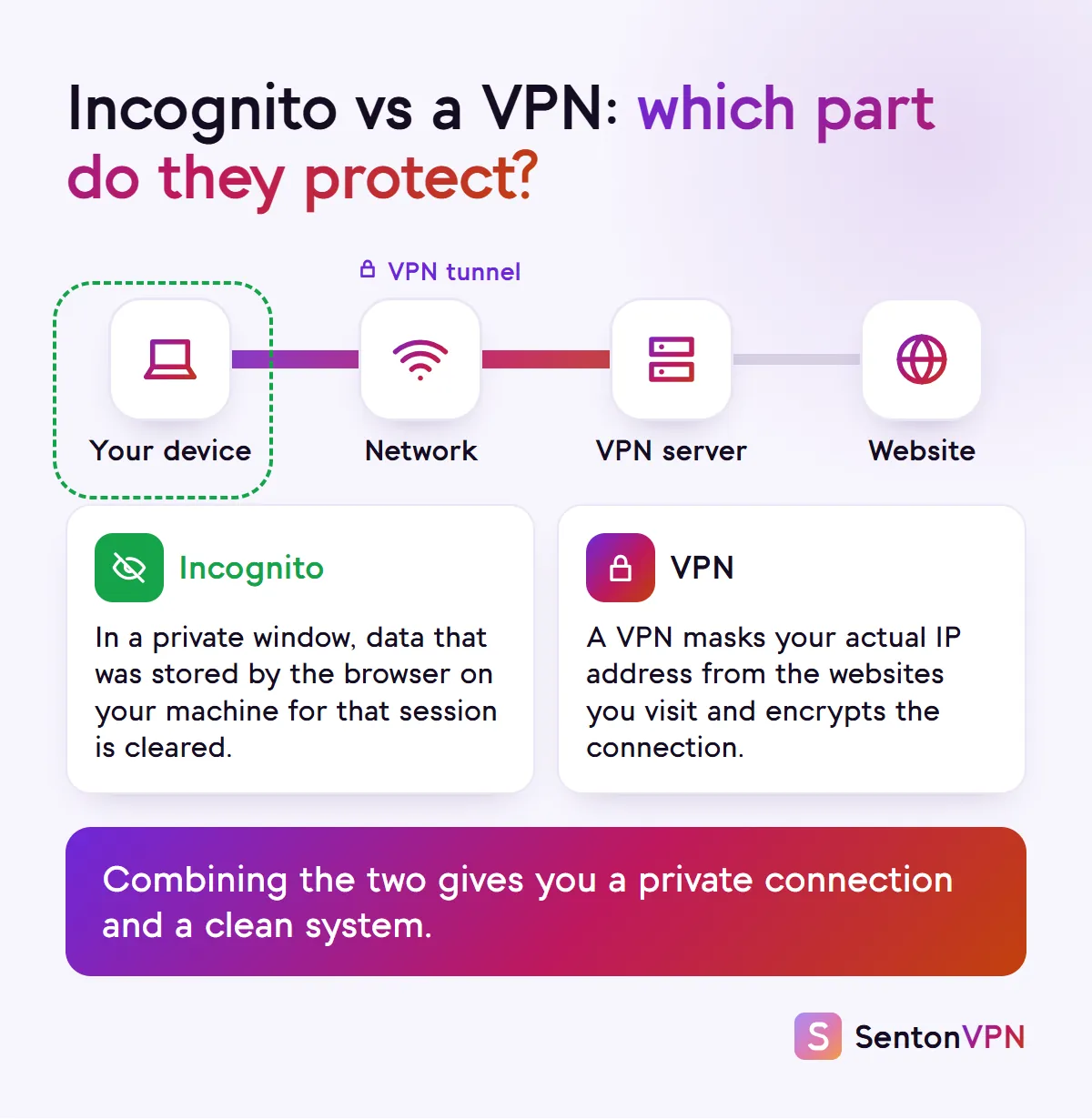
A VPN and incognito are often confused. However, they operate on different aspects of the connection. Incognito clears data from the device. A VPN provides security on the connection itself. They work best used together.
- Incognito mode
- Yes
- A VPN
- No
- Incognito mode
- No
- A VPN
- Yes
- Incognito mode
- No
- A VPN
- Yes
- Incognito mode
- No
- A VPN
- No
- Incognito mode
- No
- A VPN
- Yes, with an app
| Incognito mode | A VPN | |
|---|---|---|
| Saves no history or cookies after you close | Yes | No |
| Hides your IP address from websites | No | Yes |
| Hides the sites you visit from your network and provider | No | Yes |
| Stops tracking once you log in to an account | No | No |
| Protects the whole device, not just one browser | No | Yes, with an app |
How Senton helps
- Senton VPN encrypts your traffic and hides your IP address from the websites you visit. The Chrome extension only covers traffic from your browser. The Android app covers the entire device
- Safeweb filters requests to domains that are known to contain ads, trackers or malicious content, according to its own rules. This can prevent some trackers from being loaded within an incognito tab. Chrome disables extensions in incognito mode by default, so to use the Senton extension there, open the extension's Details page in Chrome and enable Allow in Incognito
- Kill Switch makes sure that if your connection to the VPN drops, supported traffic will not leave unprotected
The bottom line
- Incognito mode deletes only data saved by the browser on your device when the incognito window is closed
- Your activity, location and IP address are still visible to websites, Google, your internet service provider and your network while in incognito mode
- Use it in combination with a VPN. This gives you both a clean device and a private connection