You tap a button. A few seconds later you are told Connected. Between these two steps, something actually happens, despite how many people write about VPNs, few specifically tell people what actually happens through their phone and app. Some might discuss general encryption, or what a tunnel is, but not specifically what happens through your phone and app. We screen recorded this, counted each frame, and used our browser extension and app (from Dubai) both before and after to see what we could detect via websites.
How we timed the Connect button
Both were tested on 8 November 2026 using a home broadband connection in Dubai.
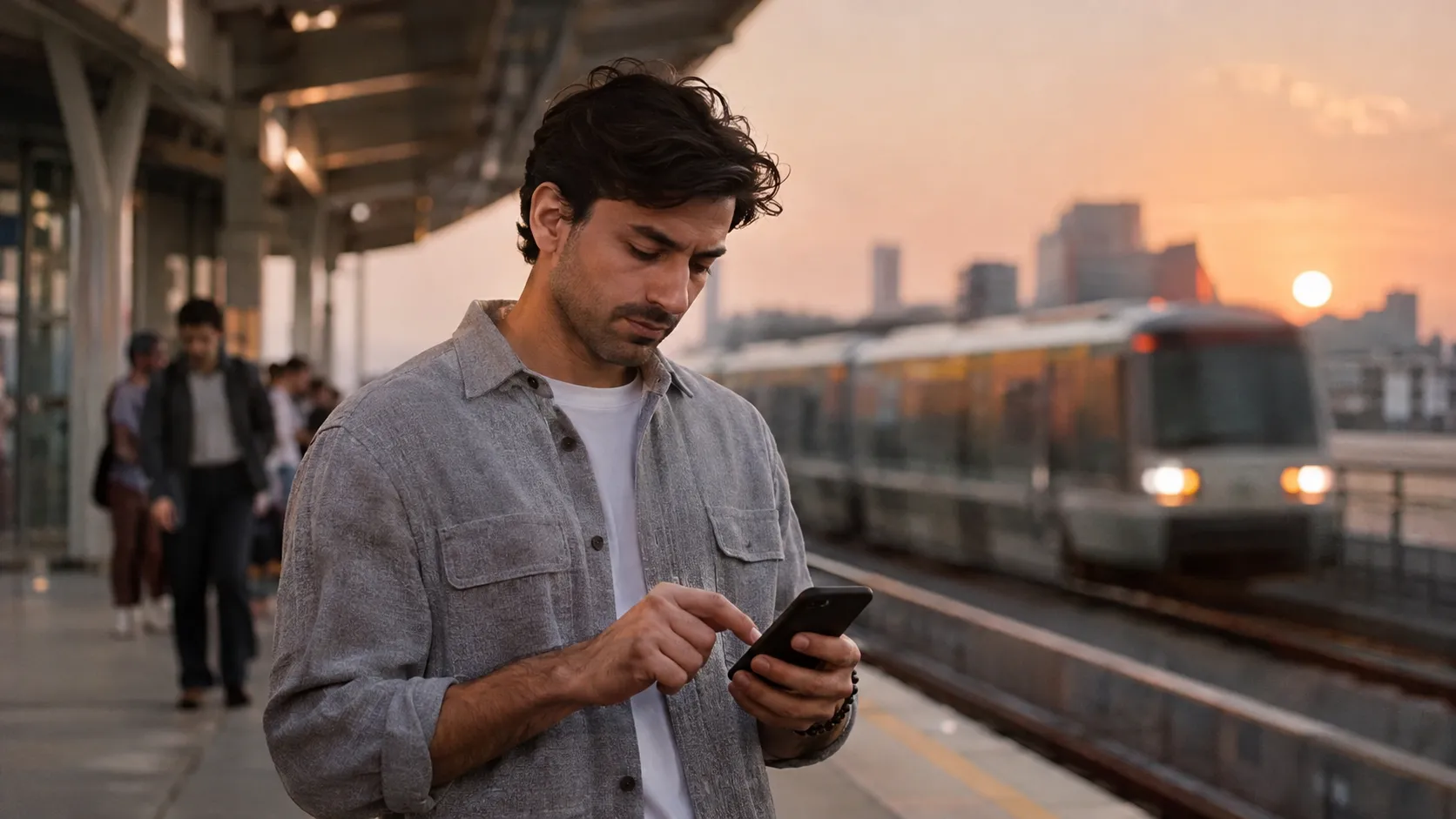
We tested on our phone by using Android's screen recorder to record our test. We opened the Senton app, selected Warsaw in Poland, tapped Connect and noted the toggle. We were able to scroll through each individual frame as the video was around 60 frames per second. At 2.094 seconds, the toggle read Connecting. At 4.162 seconds, it read Connected. Overall, this was about 2.07 seconds. After we tapped again to disconnect, the toggle changed in less than one-tenth of a second.
For testing on a computer, we had a Chrome tab open with a small script. We called an IP address lookup API every 16th of a second to let us know what IP we could see. We also called a separate API every one and a half seconds to let us know our city, country, and network. Additionally, we also used the Senton browser extension to click Connect before Disconnect.
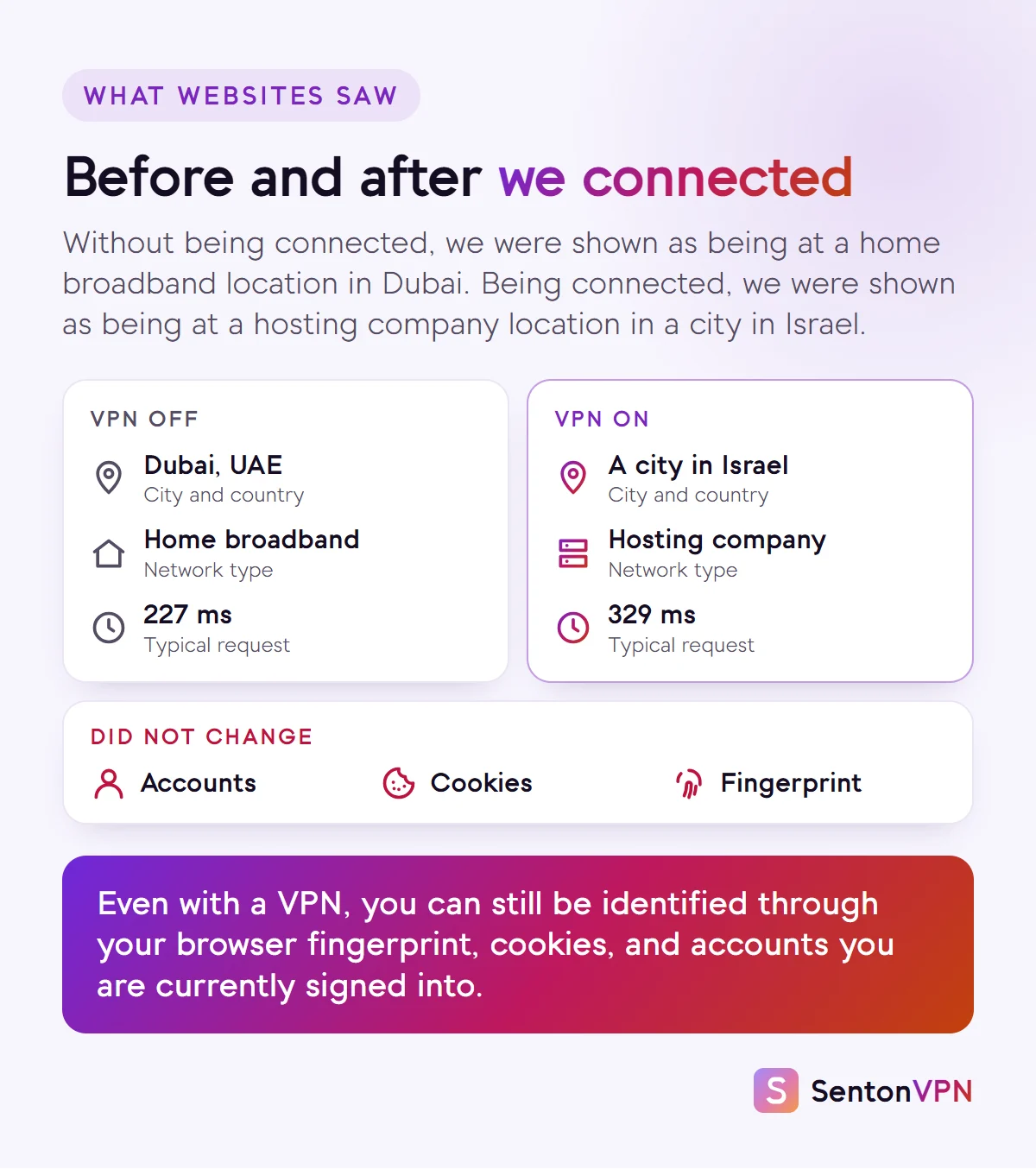
Our initial response indicated we were using a home broadband connection in Dubai. After that, we began receiving responses stating that we were on a hosting company's network in a city in Israel (previously we were being stated to be in Warsaw). Based on our home connection, we found that our last home request and our first VPN request were only 104 milliseconds apart and neither failed when switching between them. Additionally, we were able to switch back as well.
How does a VPN app work in those two seconds?
As we cannot observe what's going on inside the app when it's in use, we have outlined below (these are not timers for each item) what we believe should happen on Android based upon the WireGuard paper and Google's developer documentation for using VPN apps.
- 1Android asks for permission, the first time onlyInitially, when using the app for the first time, Android will prompt the user to allow the app to create a VPN connection. According to Google's developer documentation, initially when any app creates a VPN connection, the user must take action. This means that no app can change the VPN connection without the user being aware of what is happening. If they approve, subsequent touches will be allowed without needing to be approved again.
- 2The app gets the server's address and keyThe app determines what server was requested or, if Quick Connect was used, where the user saved the connection. It then gathers the information it needs to connect to that server: a public key and an address. Instead of using a username and password like other methods, WireGuard uses public keys to determine both ends of the connection.
What happens to each request once the VPN app is connected
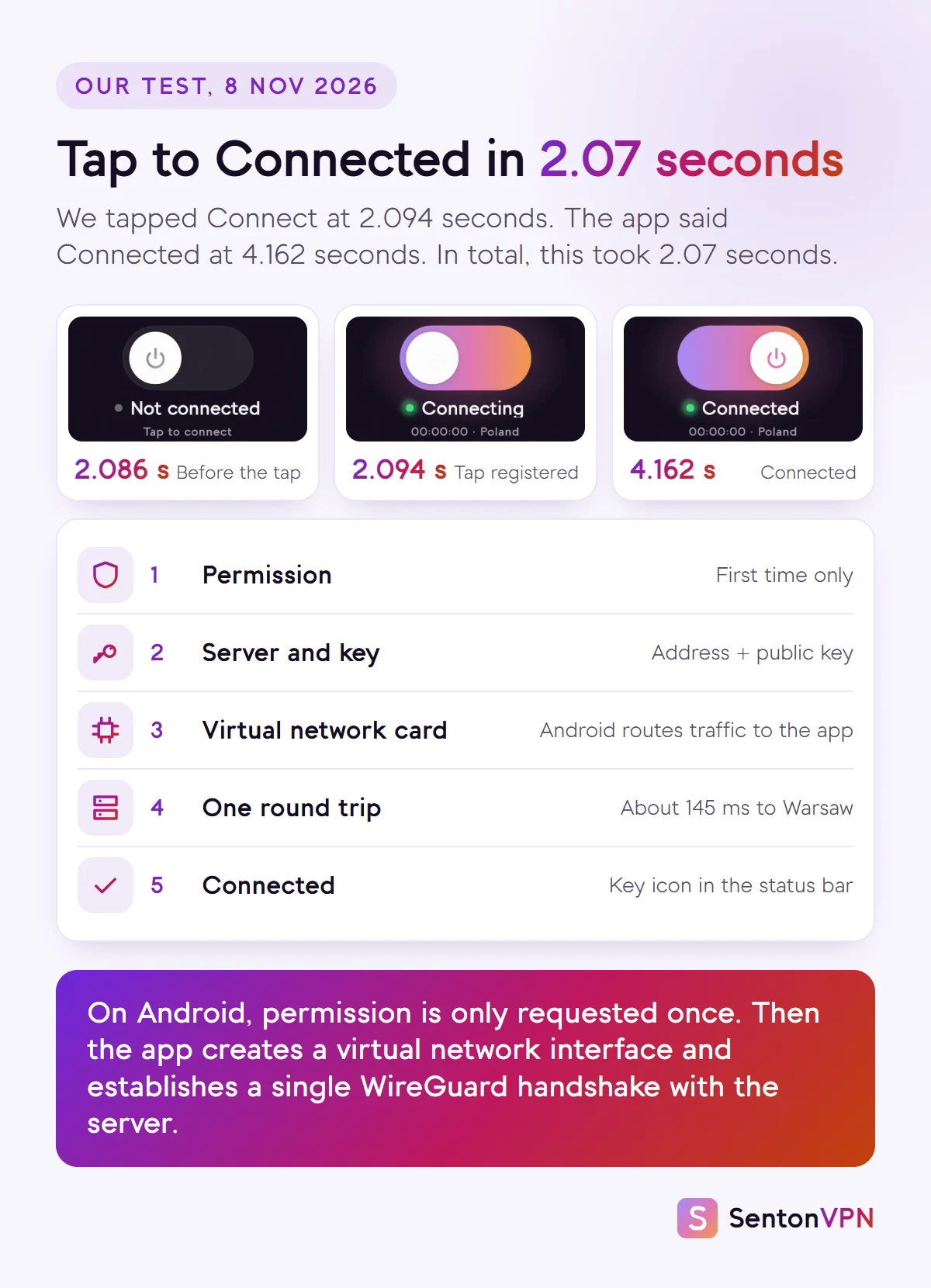
If you visit a news site, your browser will request the site as usual and not know that a VPN is even available. On Android, this request would go to the virtual interface before being read by Senton.
Senton would encrypt this information using ChaCha20Poly1305 (how WireGuard encrypts) and put it into a new packet sent to the VPN server. From there, your true internet connection (either Wi-Fi or mobile) would send this packet.
The server would get this information, decrypt it, and use its own IP address to request the news site as you would without a VPN. The news site would reply, which would be sent back to the server, then sent to your phone. Your phone would decrypt this information and put it back out through the virtual interface as if it were sent normally.
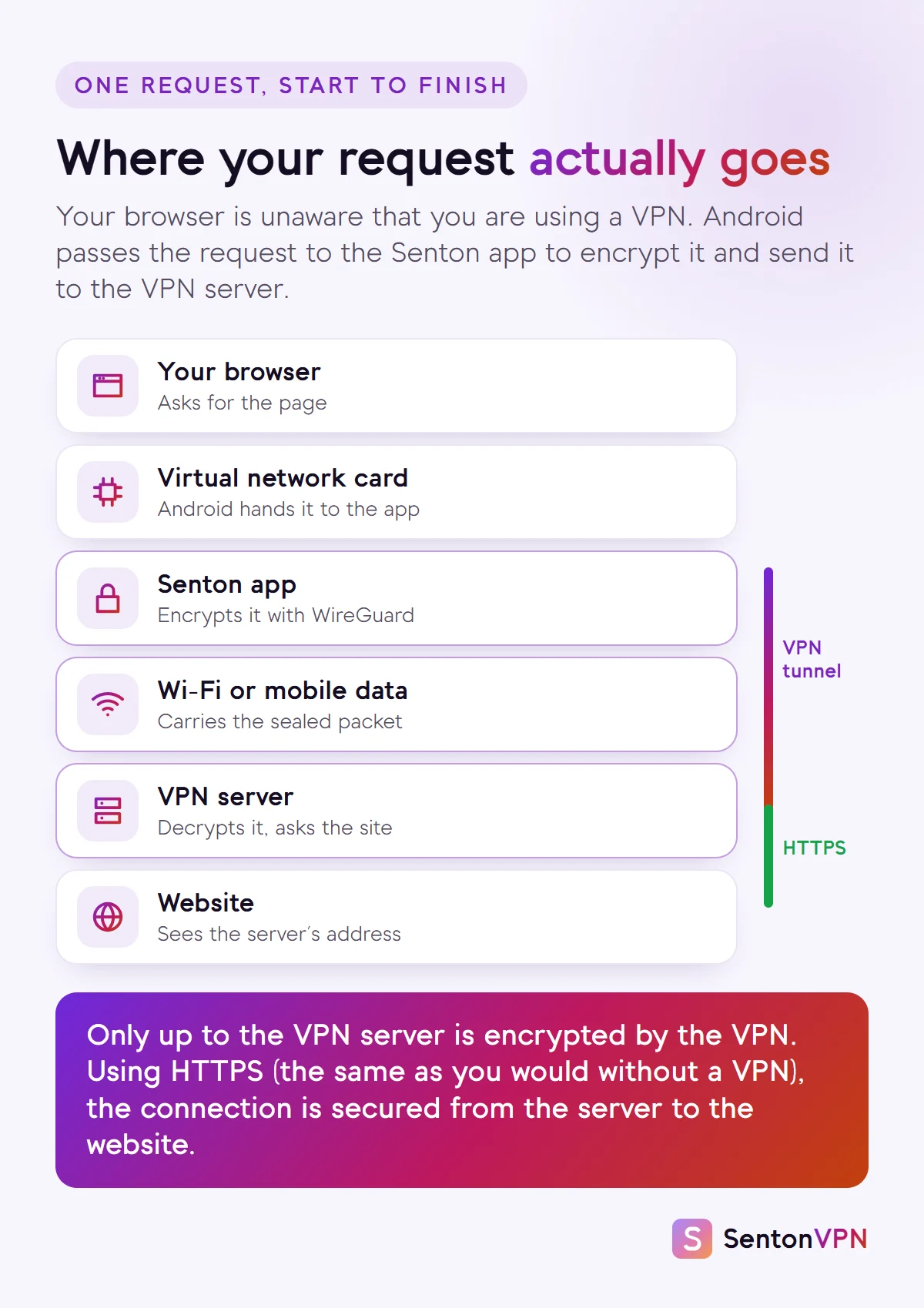
We do not say that the VPN fully encrypts the information all the way to the news site because between your device and the server, it is fully encrypted through the VPN; from the server to the news site, this would be encrypted through HTTPS (as it would be without a VPN).
Furthermore, keys do not stay the same for long: every ~2 minutes a new secure session is generated according to the WireGuard paper, and any session older than 3 minutes is discarded.
Who sees what once you're connected
Ultimately, we would like to be able to control what people can see. Based on our test, here is how it actually played out:
- Your internet provider (or whoever else owns the Wi-Fi) will be able to see that you are using a VPN, when, and how much data you are accessing. They will not know exactly which websites you are visiting through the tunnel.
- Based on what we discovered in our test, both the city, country, and network would likely change together as they assume you are coming from that VPN server.
- Finally, since you are using a server from the VPN provider (theoretically), they should be able to see where your data is going once it has been decrypted. This is why maintaining a no-logs policy is important. Otherwise, nothing truly changes about your browser fingerprint (which can still identify you), cookies already on your computer or in your account.
Why a VPN app makes things a little slower
With a VPN, we route our traffic through a server, making it slightly more effort on both ends. Without using a VPN in our test, we got an average response time of 227 milliseconds. Using a VPN that routed our traffic through an Israeli server resulted in a response time of 329 milliseconds, about one tenth of a second slower.
Right after switching to the VPN, we got a response time of 1,052 milliseconds because the browser connected through the new route before settling back to a more consistent response time.
One of the most significant determiners of response time is how far the requested server is. Requesting a server too far away will naturally result in a longer response time than being able to connect to a closer server. To reduce this variance, you can follow our guide on how to choose a VPN server.
Finally, just so you're aware, using a VPN will not necessarily help if your internet connection is already slow. But if you're experiencing a slowdown specifically for one task (covered in our guide on streaming), a VPN might help.
Phone app or browser extension: what each one covers
Both changed what websites saw in our testing, however they cover different types of traffic.
Using the Android app, you will impact your phone's (through a virtual interface) traffic. This will impact all apps except what you have told Bypasser to bypass. Using the browser extension will only impact your browser's traffic. Your email, games or other programs will still use your regular internet connection.
What happens if the VPN connection drops
Given that people regularly switch between Wi-Fi and mobile data, part of the reason this was designed (according to the paper) is because connections are not based on an IP address but rather a key that allows people to freely "roam" between any IP address (including switching between mobile, for example).
Ultimately, if the connection drops, people might also be worried that their phone would silently continue without one. Using Kill Switch (by Senton), users will not be able to use supported applications until the VPN reconnects. Additionally, with Android, users can enable an always-on VPN and decide to block non-VPN usage.