One thing that can be confusing is that "my IP" can mean any of the following: The publicly available IP people access on the internet, the private IP your computer is given by your router, the IP your phone is given when using mobile internet, and (newer due to privacy concerns) the temporary IPv6 given to both your phone and computer.
In most cases, you would not need to do anything unless you are accessing a service that notes you are suspicious due to having a new IP, you are accessing a camera at home from outside, or you only trust specific IPs at your job.
If this is you, depending on your budget, you can choose among four options: Using a static private IP given by your router (free), using dynamic DNS (free), paying your internet provider to give you a static IP (paid), or using a VPN Dedicated IP or Static IP (paid). Each of these will be explained below, what they do not fix, and how much they cost.
Is it normal for your IP address to keep changing?
Yes. The addresses are generally assigned through DHCP which is based upon leases. The standard for DHCP (RFC 2131) states that the assigned address is only for a limited time – the device requests to extend it at halfway and then at 87.5% of the original time. Once used the addresses are put back into play for further assignment.
This is openly stated by the providers. Virgin Media in the UK states that all home customers use a dynamic IP which can be changed via router restart, expiry of the lease or via reassignment within their own system. Telstra in Australia states the same – every time a user connects they are given a dynamic IP. There is no static IP available for home users on Virgin Media Ireland – individuals have to take a business account.
Simply having a new IP address does not indicate that someone has hacked into you, your router or something else has changed.
First, check which IP address changed
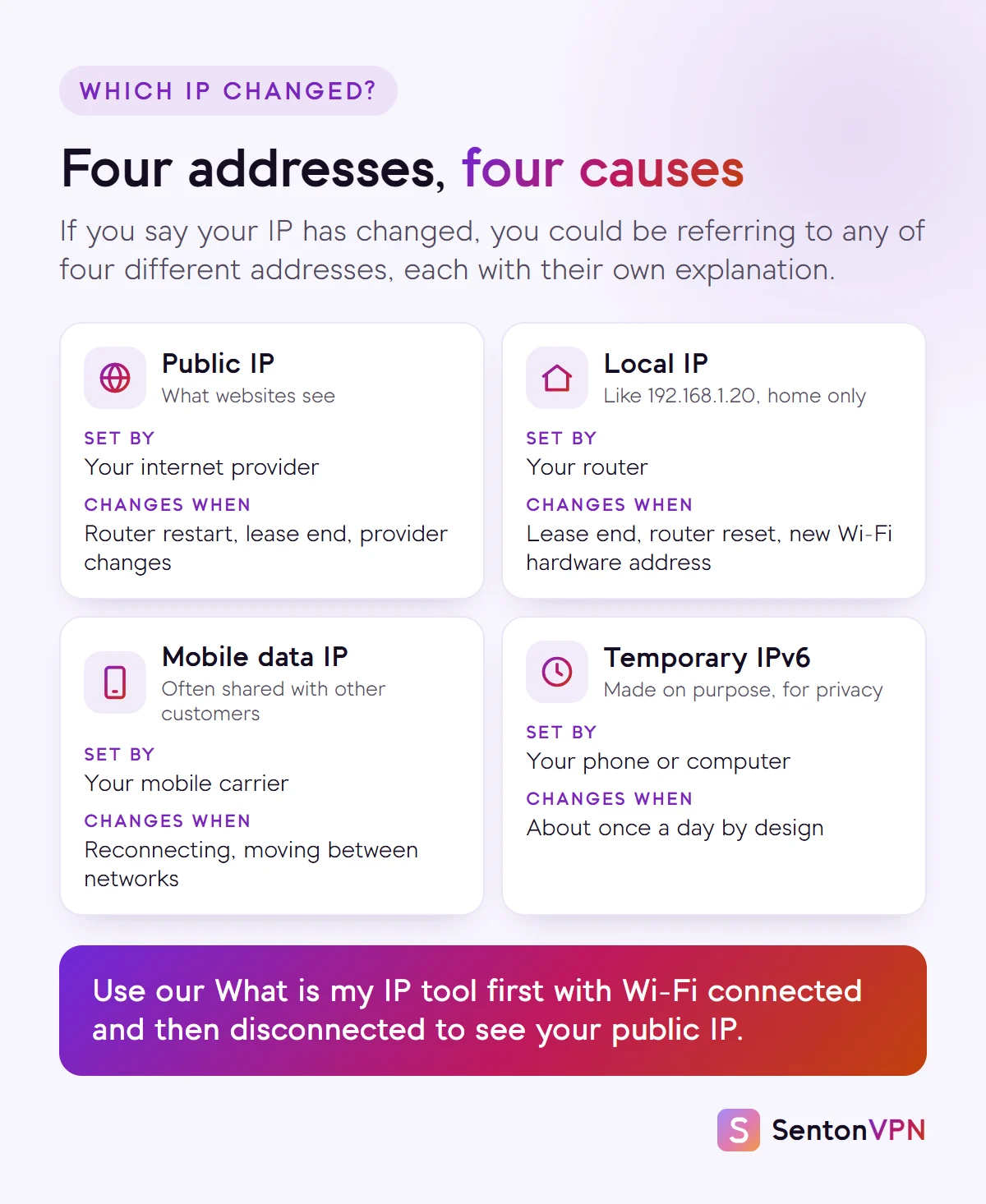
The fastest way to tell which one changed is to use our What is my IP tool first with Wi-Fi enabled and then disabled. We tested this ourselves using a du broadband connection in Dubai. Using a small script, we recorded our public IP every ten minutes from the afternoon of 15 November 2026 until early the following day. We collected a total of 56 readings and found that our IP never changed. We also found that there was no public IPv6 address associated with this connection. This shows that with a home connection, it is possible for the same IP to remain assigned for many hours. If it appears to be constantly switching on yours, it is likely that your phone is switching between connections rather than your router.
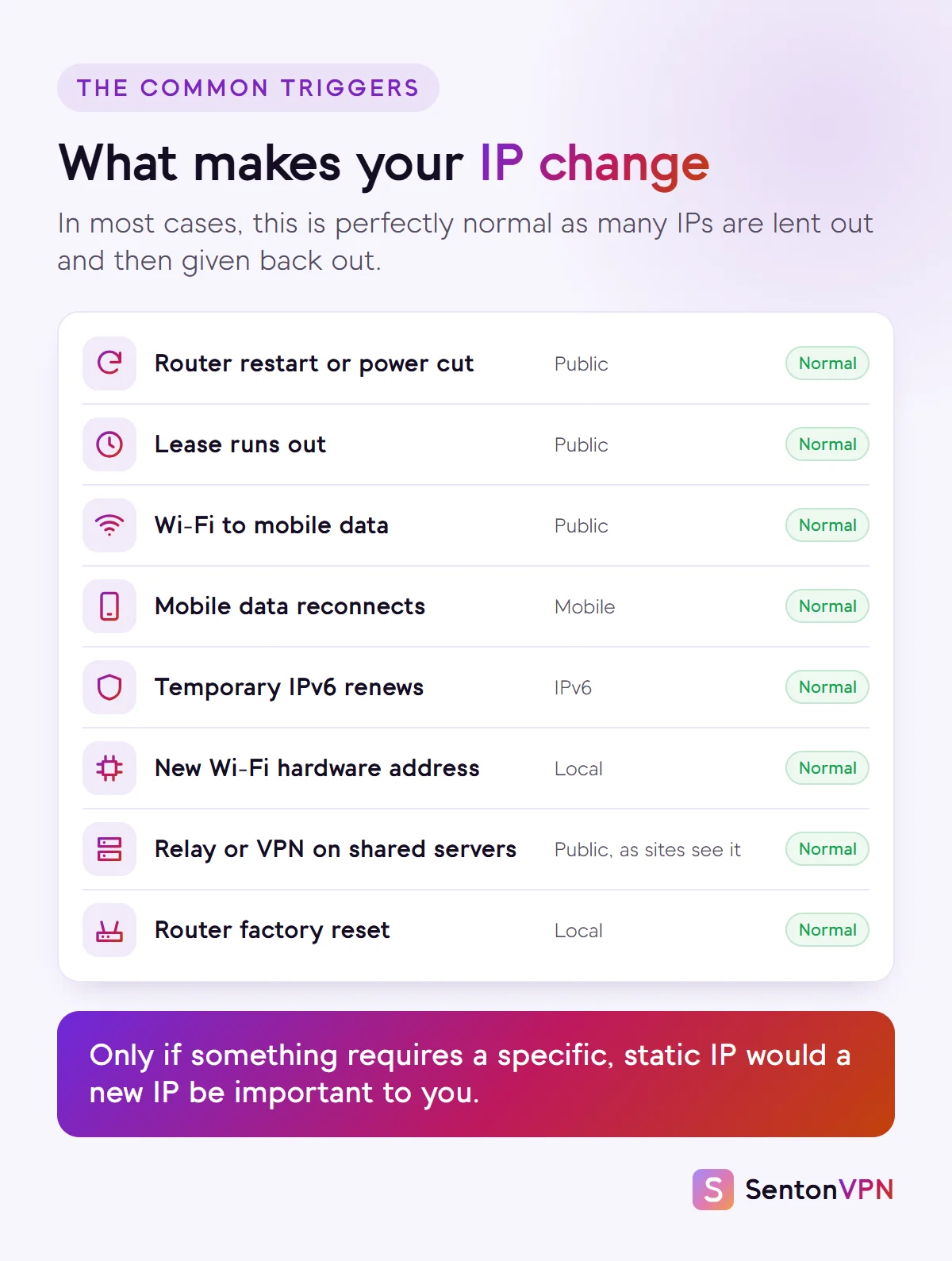
What makes your IP address change: the common triggers
- Which IP
- Public
- Normal?
- Yes
- What to do
- Nothing, unless you need a fixed IP
- Which IP
- Public
- Normal?
- Yes
- What to do
- Ask your provider about a static IP
- Which IP
- Public
- Normal?
- Yes
- What to do
- Nothing: each network has its own address
- Which IP
- Mobile data
- Normal?
- Yes, and often shared
- What to do
- A VPN Static IP or Dedicated IP if you need one address
- Which IP
- IPv6
- Normal?
- Yes, it is a privacy feature
- What to do
- Leave it on
- Which IP
- Local
- Normal?
- Yes
- What to do
- Reserve a local IP on the router
- Which IP
- Public, as sites see it
- Normal?
- Yes
- What to do
- Switch it off for that site, or use a Static IP or Dedicated IP
- Which IP
- Local
- Normal?
- Yes
- What to do
- Set your reservations again
| Trigger | Which IP | Normal? | What to do |
|---|---|---|---|
| Router restart or power cut | Public | Yes | Nothing, unless you need a fixed IP |
| The lease runs out or the provider reassigns it | Public | Yes | Ask your provider about a static IP |
| Switching between Wi-Fi and mobile data | Public | Yes | Nothing: each network has its own address |
| Mobile data reconnects | Mobile data | Yes, and often shared | A VPN Static IP or Dedicated IP if you need one address |
| Temporary IPv6 address renews | IPv6 | Yes, it is a privacy feature | Leave it on |
| Private Wi-Fi address or random MAC | Local | Yes | Reserve a local IP on the router |
| iCloud Private Relay, Edge Secure Network or a VPN on shared servers | Public, as sites see it | Yes | Switch it off for that site, or use a Static IP or Dedicated IP |
| Router reset to factory settings | Local | Yes | Set your reservations again |
As you can see in the table, essentially, any reason can be grouped into two main categories: either your internet provider issues a new IP because of a change in your network connection or because of their lease.
If your router is left constantly online, it will typically request the same lease before it expires – leading to your IP being available for days or even weeks. If your connection goes offline for a long time, you reset your router or you experience a power failure, that request chain breaks and your provider can give you a new IP from their available pool.
Why does my IP address keep changing on my phone?

On mobile data, many use carrier-grade NAT to share the mobile data address with other users. According to a 2016 report published by APNIC, nearly 94% do use this. Switching to mobile data upon leaving home can result in instantly getting a different public address as websites detect this change.
Additionally, people also have privacy settings that can change addresses. Starting with iOS 18, users can enable the Private Wi-Fi Address to be Rotating, Fixed, or Off. Using a Rotating setting will change the phone's hardware address approximately every two weeks. Left as the default, using a Fixed address is typically when connected to a WPA2 or stronger network. Starting with Android 10, the default is to use a random hardware address for each network. Changing this hardware address can result in using a new local IP address assigned by the router. Finally, with iCloud Private Relay, Safari requests are given a temporary IP address (although Apple states that this is not available in all countries).
How often does an IP address change?
There's no fixed timetable for such changes – it depends upon your provider, the length of leases and equipment reconnection routines – and few providers publish such a figure. On a home line the public address can either stay the same for a long time with renewals of the same lease, or change on the next power drop.
Temporary IPv6 addresses are the exception in terms of change schedules. The current standard – RFC 8981 – specifies a default figure of one day for preferred lifetime and two days for valid lifetime. Apple uses 24 hours. On our own Windows 11 test PC the temporary addresses were switched on with a maximum lifetime of seven days – the router local lease for the laptop was 24 hours though.
Google's own measurements of IPv6 traffic passed 50% for the first time in April 2026 according to APNIC data – meaning more and more people every year see these types of rotating addresses.
When a changing IP becomes a problem
- What goes wrong
- A sign-in from a new place can look unusual, and text-message codes may not work
- What helps
- Usually nothing. If it keeps happening, one fixed address helps
- What goes wrong
- Entra reads your location from your public IP. Through a VPN it sees the VPN's address
- What helps
- A static IP from your provider, or a Dedicated IP your company can add
- What goes wrong
- The home address you saved stops working when it moves
- What helps
- Dynamic DNS, if your router has a public WAN address (ASUS: not behind another NAT)
- What goes wrong
- AWS advises allowing these only from set IP ranges, so a new home IP can lock you out
- What helps
- A static IP or Dedicated IP you can allow
| Where it shows up | What goes wrong | What helps |
|---|---|---|
| Account sign-ins, for example Google | A sign-in from a new place can look unusual, and text-message codes may not work | Usually nothing. If it keeps happening, one fixed address helps |
| Work allowlists, for example Microsoft Entra | Entra reads your location from your public IP. Through a VPN it sees the VPN's address | A static IP from your provider, or a Dedicated IP your company can add |
| Cameras, storage and game servers at home | The home address you saved stops working when it moves | Dynamic DNS, if your router has a public WAN address (ASUS: not behind another NAT) |
| Cloud servers (SSH, remote desktop) | AWS advises allowing these only from set IP ranges, so a new home IP can lock you out | A static IP or Dedicated IP you can allow |
How to keep the same IP address: which fix fits you
- Fix
- Address reservation on your router
- Cost
- Free
- What stays the same
- The local IP only
- Fix
- Dynamic DNS
- Cost
- Free on many routers
- What stays the same
- A name that follows your IP
- Fix
- A static IP from your provider
- Cost
- Telstra: $10 a month. Virgin Media Business: from £5 a month ex VAT. BT Business: included on Enhanced plans
- What stays the same
- The public IP, though the provider can still replace it
- Fix
- Senton Static IP
- Cost
- Included in eligible plans
- What stays the same
- An IP you can reconnect to, shared with others on that location
- Fix
- Senton Dedicated IP
- Cost
- A paid add-on
- What stays the same
- An IP reserved for your account while the add-on is active
| You need | Fix | Cost | What stays the same |
|---|---|---|---|
| The same local IP for a printer, camera or console | Address reservation on your router | Free | The local IP only |
| To reach devices at home from outside | Dynamic DNS | Free on many routers | A name that follows your IP |
| A fixed public IP for a home or office line | A static IP from your provider | Telstra: $10 a month. Virgin Media Business: from £5 a month ex VAT. BT Business: included on Enhanced plans | The public IP, though the provider can still replace it |
| The same IP when you connect through a VPN | Senton Static IP | Included in eligible plans | An IP you can reconnect to, shared with others on that location |
| An IP that only your account uses | Senton Dedicated IP | A paid add-on | An IP reserved for your account while the add-on is active |
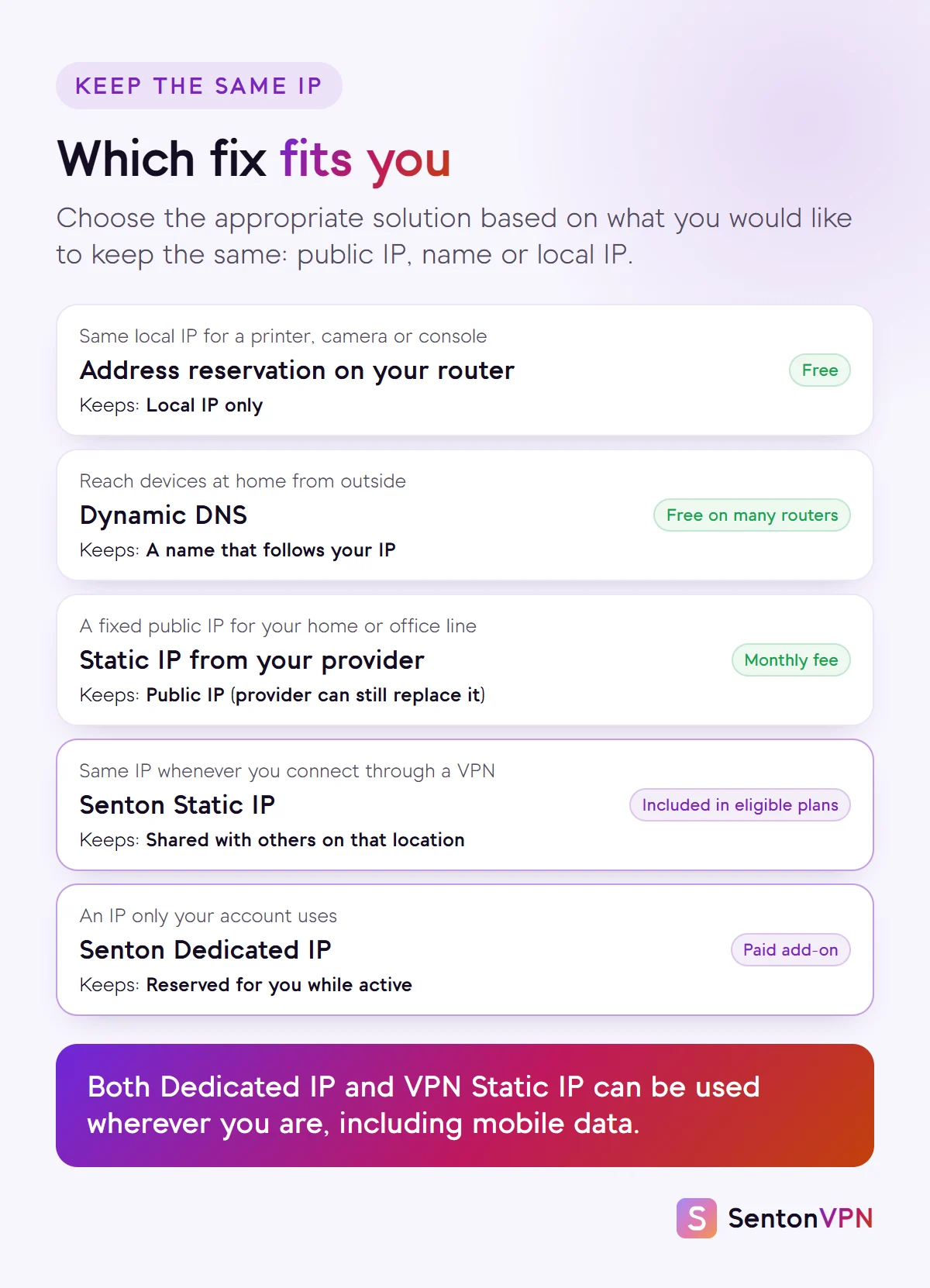
We looked up what a few providers actually charge – it's less simple than "pay for a static IP". Telstra in Australia charges $10 a month but retains the right to swap the address after just 14 days' notice. BT Business includes one in its Enhanced plans. du's page for the UAE says new Business Complete activations don't get a static IP at all. Before you pay then, check whether they can still change the address and whether your plan qualifies. For devices within the house though you can skip all of that and reserve the address on your router – free for this purpose. Dynamic DNS will do most remote access needs. For mobile data though you can get Senton's Static IP shared with others in the same location or a Dedicated IP reserved for your account whilst the add-on is active. Neither is permanent.

Is a fixed IP address worse for privacy?
A little. Because having a constantly changing address makes it harder to "follow" people over weeks – that's why temporary IPv6 addresses exist. Having a static address is easier to recognize. While having a camera at home or allowlisted for work is a reasonable compromise, regularly browsing the internet is a poor one. We dive deeper into this in our articles about how to hide your IP address and what someone can do with your IP address.
Common myths about changing IP addresses
Many assume that getting a new IP address means they've been hacked. Typically, most providers assign IP addresses this way. Many also assume that restarting the router will give you a new IP – this is not guaranteed and depends on the provider. Some refer to static as being more secure – it just means it remains the same. As for VPN Static IP, it is not truly yours alone because others using that location share it. A Dedicated IP is reserved for your account.