

The thing every VPN offers is the ability to change the country you seem to be browsing from. Choose a country. Connect. On a good day the whole process is under a minute.
Then there's a website that detects your actual city. Or maybe a map will drop a pin on your street. Both of those are worth understanding: how to change the location properly, and why something on your phone apparently knows more about where you are.
- Where it comes from
- The public address your traffic arrives from
- What a VPN does to it
- Changes it to the country you picked
- Where it comes from
- Satellites, nearby Wi-Fi, mobile masts and phone sensors
- What a VPN does to it
- Leaves it alone, unless Geo-Spoofing is on
- Where it comes from
- Cookies, saved preferences and the country on your account
- What a VPN does to it
- Does not touch it
| Type of location | Where it comes from | What a VPN does to it |
|---|---|---|
| Connection location | The public address your traffic arrives from | Changes it to the country you picked |
| Device location | Satellites, nearby Wi-Fi, mobile masts and phone sensors | Leaves it alone, unless Geo-Spoofing is on |
| Remembered location | Cookies, saved preferences and the country on your account | Does not touch it |
What actually changes when you change VPN location
Does a VPN change your IP? Yes. That is almost certainly what was being asked. When you connect to a VPN, your traffic is sent from a server in the selected country. Websites will see an IP address associated with that server, not your IP address over your home internet connection. Based on the information they deduced from your old IP address, they will now deduce information based on your new IP address.
What does not change is your device. Your phone still knows its location via mobile masts, Wi-Fi and satellites. Your browser still remembers the permissions you've given. Your accounts still remember which country you signed up in. These are separate systems, and a VPN does not extend into them.
How to change your VPN location in 6 steps
The first three steps change your location. The last three are what most guides leave out, and they are the reason it sticks.
- 1Choose your countryDistance costs speed, so pick the closest country that does the job rather than the most exotic one on the list.
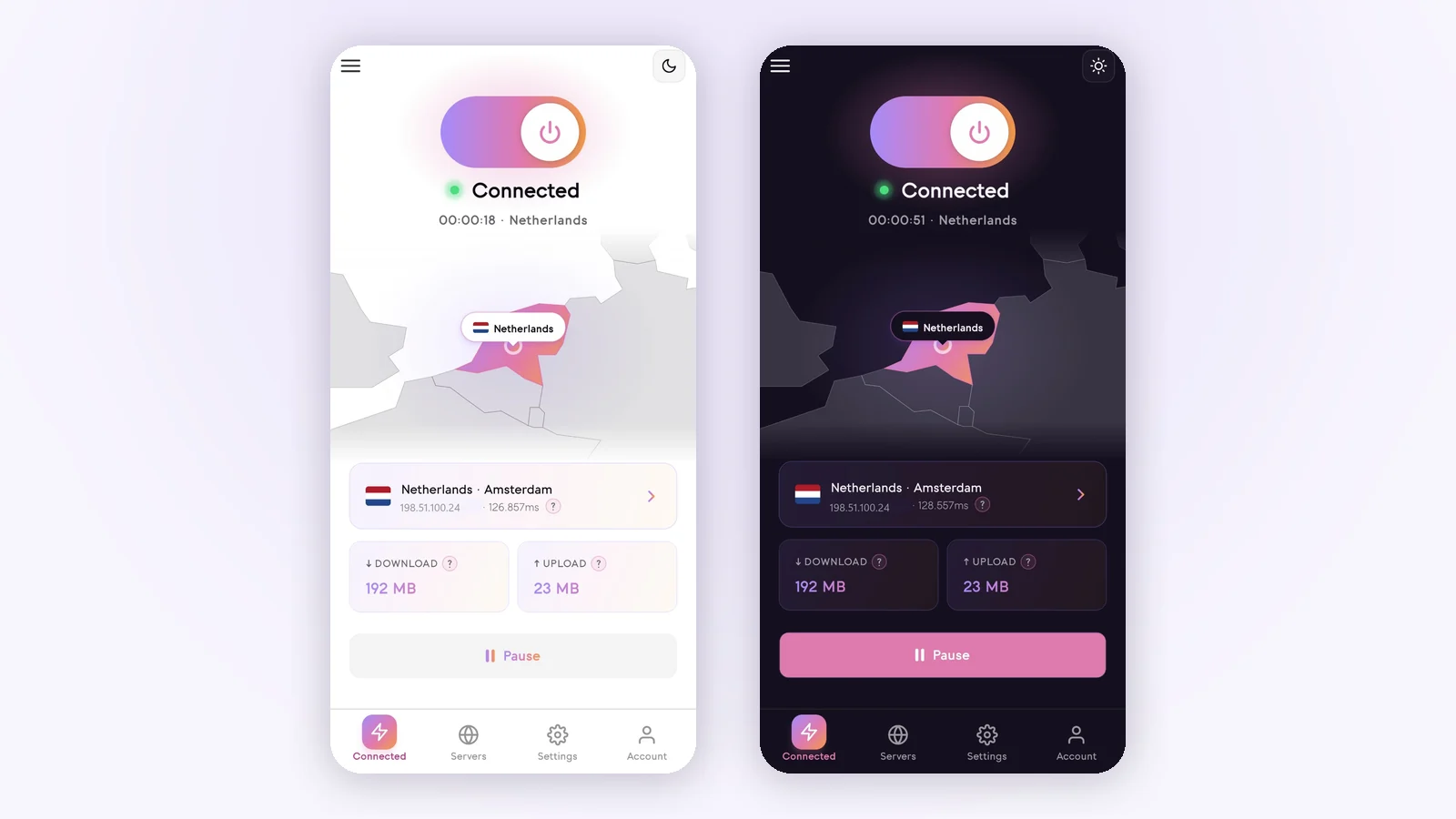
- 2Connect to a server thereIn Senton you open the location list, choose the country and connect. The connection screen then shows which location is live.
- 3Check the address changedUse our what is my IP page. It should now show the country you chose.
- 4Reopen the site privatelyA private window leaves behind the cookies and the country the site remembered from last time.
- 5Turn off location permissionA browser that can read your device location will carry on doing so whatever your VPN says.
- 6Check your bypass rulesAnything excluded from the tunnel still uses your ordinary connection and still shows your ordinary location.
- Public address shows the country you picked
- Site reopened in a private window
- Location permission switched off for that site
- Nothing important sitting in your bypass rules
- App closed and reopened, if an app is the problem
Which VPN location should you use?
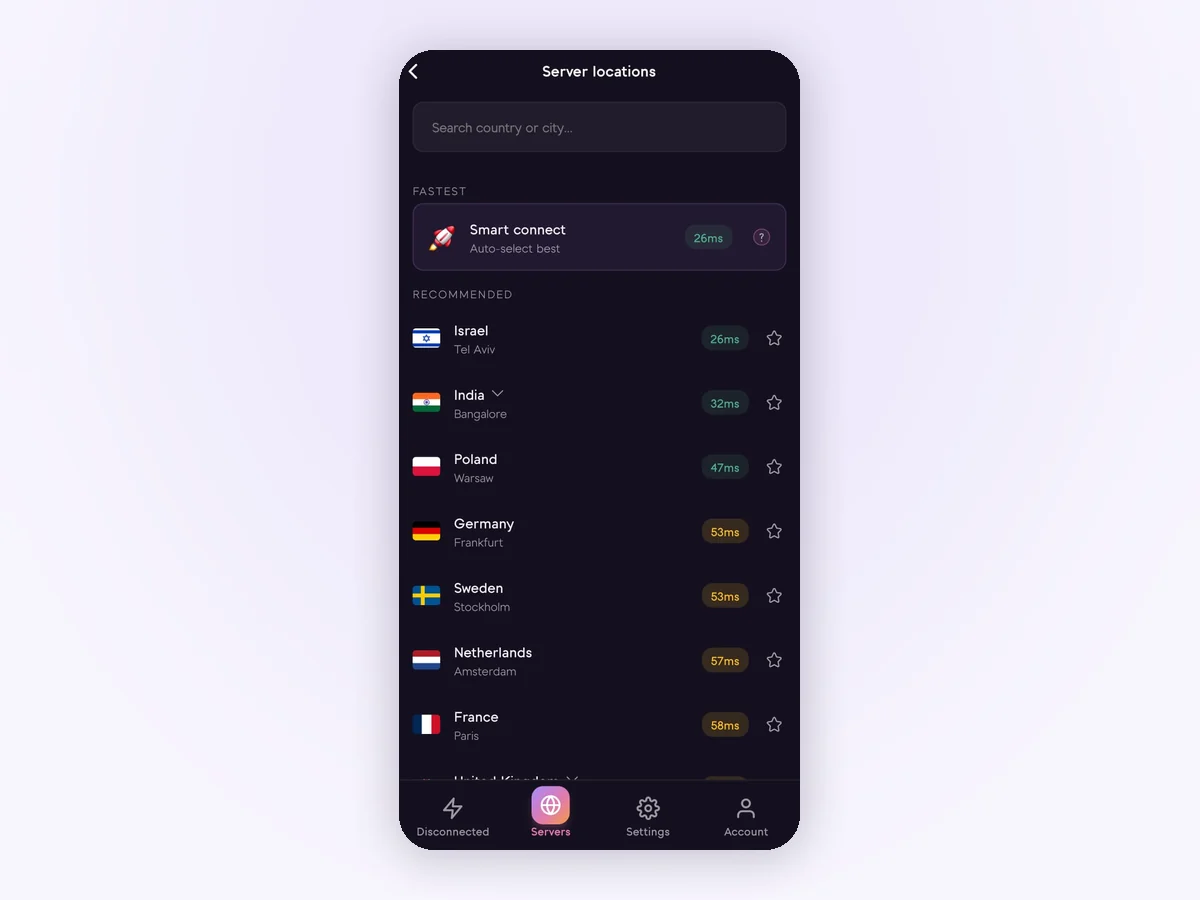
Choose a country that is appropriate for everyday use and stay with it. Most reasons for changing location do not require a specific country. Distance costs speed. Only choose a specific country when the task requires it, such as reaching a service from your home country while you travel. Senton has servers in 50+ countries to pick from.
Three questions settle it in most cases.
- Do you need one particular country, or simply a different one?
- Does speed matter more here than the country does?
- Will you sign in to an account that expects your usual country?
If none of them point at a specific country, take the nearest one and move on.
Changing VPN location on iPhone, Android and in a browser
The steps appear the same across all platforms. What varies is what those steps cover. With Android, the app handles the traffic that the system routes to it. With a browser extension, the extension reaches only that browser, and every other program on the machine continues to use your original address. Senton ships an Android app and a Chrome extension today, with iPhone and desktop still to come, and the current list lives on our apps page.
How to check your VPN location actually changed
Try testing the connection by itself before you start looking for a problem. Turn off the VPN and check your address, then connect to a server in a country that is obviously different from your own and check again. If you're based in the Gulf, a country such as Germany or the United Kingdom will make this difference very obvious.
If the new address is in the same country as the server you have chosen, and the address has actually changed, then your VPN is working properly. If you then encounter any oddity, it is one of the seven problems listed below, not a connection problem.

Why a website still shows your real location
This is where users return to Google. The connection has changed but the page still displays your city. Below are all the possibilities that may occur, in the order in which they most commonly do.
1. Your browser has permission to see your device location
This is the most commonly encountered one. If you once clicked Allow on the popup that asks whether a site may know your location, you have given that website the geolocation permission, and it can continue to access your device's location instead of deducing it from your address.
On a phone that is more accurate than a location guess based on an IP address. This means that your browser can inform a website that your phone is in Dubai, while you are actually connected to a server in London. Both can indeed be true at once, which is why the website looks as though it has caught you out. Changing servers does not revoke any permissions you have already granted.

2. Your phone works out where it is without your address
An IP address is just one piece of the puzzle. Location on a mobile phone can be determined using satellite data, nearby Wi-Fi routers, mobile masts and also location sensors within the phone itself. This system is completely unaware of which country your data leaves from when you use a VPN. As a result, a location service can still determine your position even though your connection may seem to be originating from a different country.
- VPN location: where your internet connection appears to come from.
- Device location: where your phone itself believes it is standing.
This is more apparent with apps than with browsers. Location permission for an app is requested by the app from the operating system independently of the VPN. Thus, an app granted months ago will continue to report your true location.

3. The website remembers where you were before
There are times when nothing is actually wrong and the site simply remembers you. Cookies and other data stored in your browser outlast any change in address. Pick a language, city, or country once and many sites will continue to deliver that experience to you long after.
Now imagine that you visit an online store based in the UAE and choose that location as your region. If you then return later from a German IP address, you might still see the UAE storefront. This is because your saved region preference is more specific than an inference made from your address, and switching IP addresses does not cause previously saved preferences to be removed from your browser. A private window would resolve this immediately.
4. Your account already has a country attached to it
Signing in gives a service far more than a lookup by address. A user account can remember the country associated with the profile, the card used to pay for it, the region of the app store where it was created, previous shipping addresses, and all previous sign-in locations.
Most services tend to place more value on that history than on whatever your connection claims today. Google does this with its search results, which can use past activity and location information from a user's device as well as the address in front of it. A new address does not eliminate this information, which is why you may see a different version of the same site when you are signed out compared to when you are signed in.
5. The location database is simply out of date
There is also a less obvious possibility. Your VPN may have changed your address correctly, but the site then looked up that address in a database that disagrees. No one physically locates an address. Instead, sites query a commercial database. These databases vary from one another and also go out of date, a point Cloudflare makes plainly about geolocation.
- The right city on one site
- A neighbouring city on another
- The right country but the wrong city
- An old location on a third, because that database has not caught up
None of that means your own address leaked. If step three showed the right country, the connection is fine and the database is wrong.
6. Some of your traffic is not going through the VPN
Some apps do benefit from being sent outside the tunnel. It can also be a very effective method of confusing yourself. Anything you exclude will continue to use your usual connection and report your usual position.
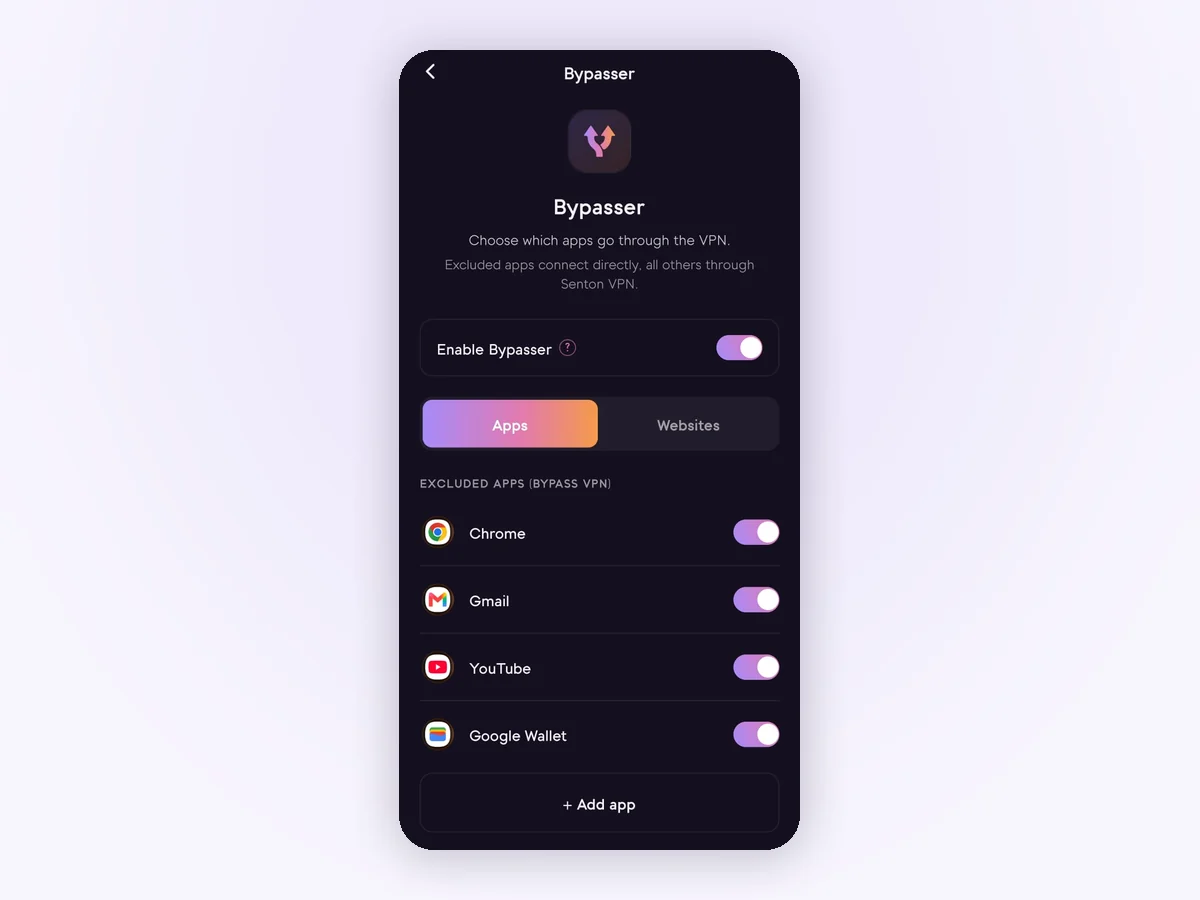
Senton's Bypasser works this way. Traffic routed around the tunnel goes out normally. If one app detects your VPN country and another detects your actual country, recheck your bypass settings before blaming the connection.
7. The site is comparing several signals at once
Working out where you are is no longer a single lookup. Your location can be determined by a combination of your VPN country, permission in your browser, your account country, old cookies, your language on the device, your time zone and your app permissions.
Connection country
The one a VPN changes.
Device position
Satellites, Wi-Fi and masts.
Browser permission
Granted once, kept for good.
Account country
Billing, region and history.
Stored cookies
What you chose last visit.
Device language
A quiet hint on its own.
Time zone
The one people forget.
App permissions
Asked of the phone, not the VPN.
Each one says something minimal on its own. In combination, however, the inconsistencies stand out: a UK address, a time zone from the Gulf, a UAE account, and finally the browser naming Dubai. None of that was deduced by breaking encryption. It was all available in the signals.
Can a VPN change your GPS location?
Most of the time, not. A VPN only alters your location by address, and your actual device location remains unchanged. Which is why switching to a different country may have no impact in an app that already has permission to access your location, and why using only a VPN will not move you on a map, in find-my-device functionality on a phone, or in a family location-sharing app.
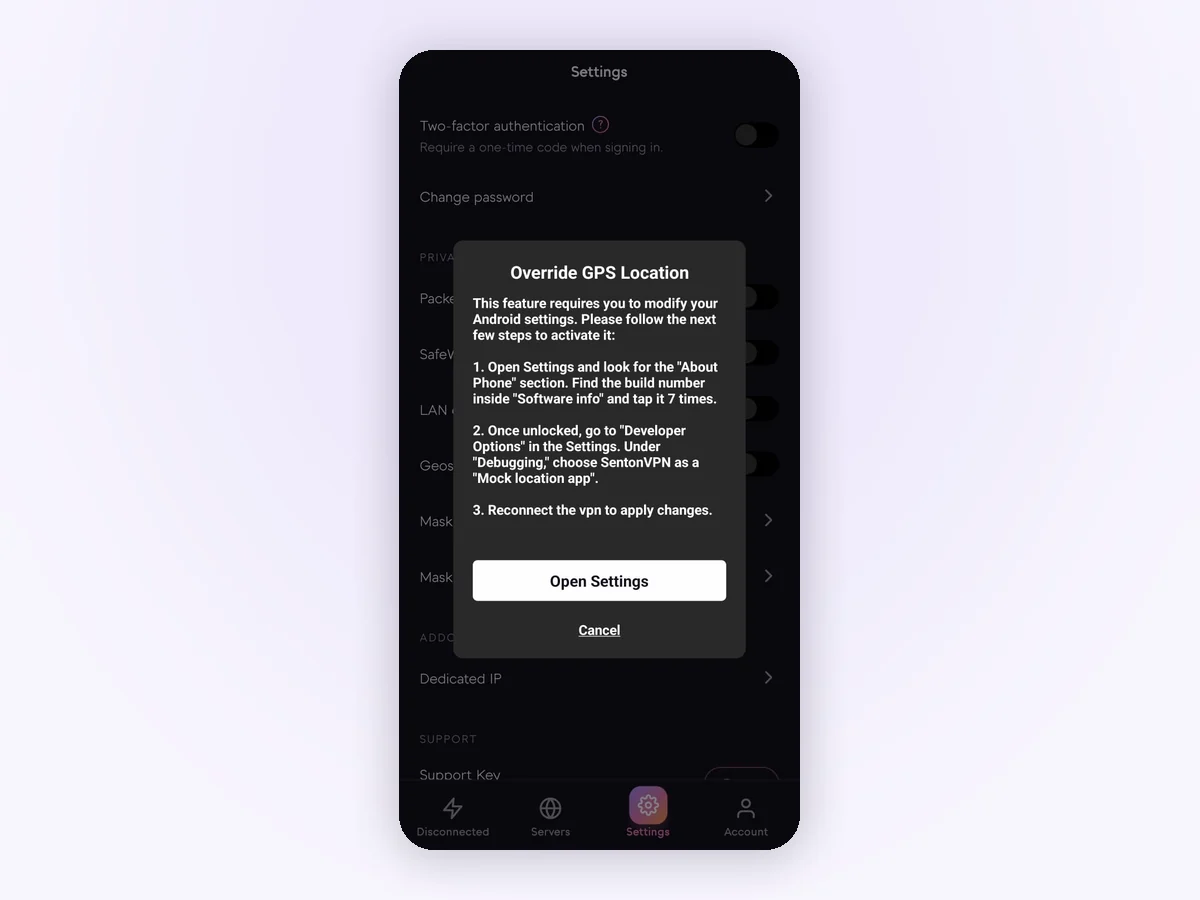
On supported Android devices, Senton does this separately through Geo-Spoofing. If the app is granted Android's mock-location permission, the location reported to supported apps can be set to match the country of the VPN you are using. This relies on the app and the platform. Some apps will reject mock location information or use other signals. It has no effect on your actual location, the country associated with your account or your payment information.
What changing your VPN location cannot do
It does not make you anonymous. If you sign in, you are identified. From there, it is up to your browser, tracking scripts, cookies and the like. Senton's Safeweb cuts down requests to domains known for advertising, tracking and worse while you are connected. It does not guarantee to block everything, since a large amount of tracking never intersects with a domain that a filter could catch.
It doesn't affect the rules you are subject to. Using a VPN is lawful in most countries, although a few restrict it, which we cover in our guide on whether VPNs are legal. Again, a service may have its own terms. Many platforms restrict the actions you can take from a foreign country, and changing countries does not affect those restrictions. What we do and do not keep is set out on our no-logs policy page.
IP location and physical location are not the same thing
If there is to be one thing taken away from this article, let it be this. A VPN alters the location associated with your internet connection. Everything else, from satellite positioning and Wi-Fi scanning to browser permissions, account settings and stored data, remains the same.
Just because you can see your actual city somewhere doesn't necessarily mean your VPN didn't work. First check your public address. Then figure out what other signal the site is picking up, and whether you'd like to continue sending that signal.


