
In 2019 the head of Chrome engineering published on Google's blog that fingerprinting was bad as there is no way to "reset" a fingerprint like there is for a cookie. Then in December 2024 Google informed advertisers that they will no longer prohibit fingerprinting on their advertising products. If you use Chrome as your browser this is relevant and Chrome itself provides very little protection against fingerprinting.
What is Chrome fingerprinting?
Chrome fingerprinting is a type of browser fingerprinting directed at users of Chrome.
A site can run a small script to collect information provided by your browser each time you visit the site. This includes information like Chrome version, time zone, graphics card, installed fonts and screen resolution. This individual information is fairly common but the combination is often sufficiently rare to identify a specific browser out of a population of millions. None of this data is stored on the user's device, so there is nothing for the user to delete. For the full picture, see our guide to what browser fingerprinting is.
What Google changed, and when
Google has changed its stance on fingerprinting significantly in just a few years. The following dates are important and are sourced either from Google or from the UK regulator.
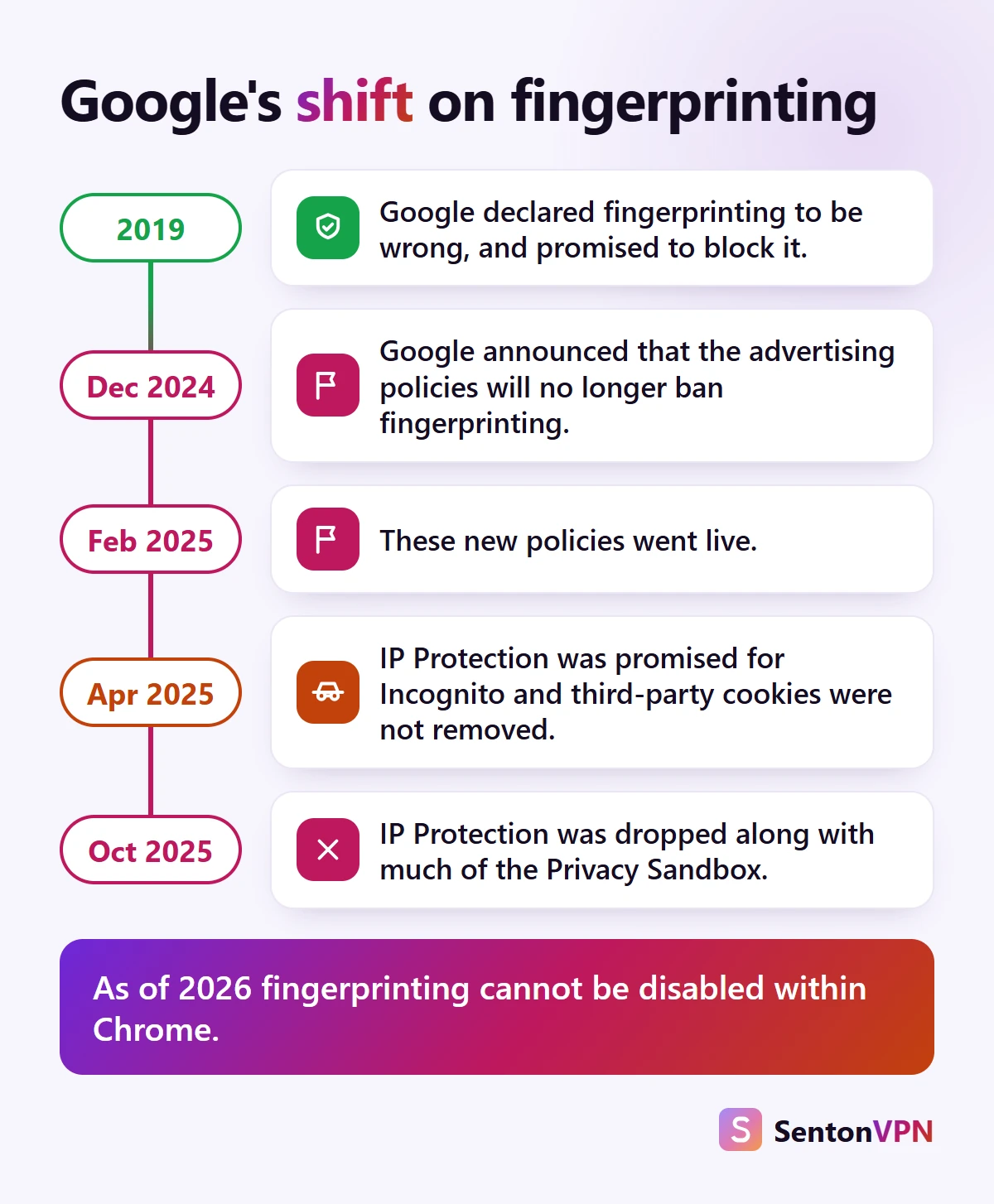
- 1August 2019The director of engineering for Chrome stated that fingerprinting was wrong, that it could not be cleared by the user and that Chrome would be taking a more aggressive stance against it.
- 2December 2024Google informed advertisers that from 16 February 2025 fingerprinting would no longer be prohibited by the advertising policies on Google's advertising platform. The UK Information Commissioner's Office deemed this action irresponsible.
- 3February 2025The new advertising policies went into effect for businesses using Google's advertising products.
- 4April 2025Google stated that it would continue its current stance on third-party cookies in Chrome and would introduce IP Protection in Incognito mode later in the year.
- 5October 2025Google announced the deprecation of most of its Privacy Sandbox initiatives including IP Protection due to low adoption.
As of 2026 Google, which previously stated it would oppose fingerprinting, now allows fingerprinting on its advertising platforms, and the Incognito mode protection that was planned has been dropped.

Does Chrome have fingerprinting protection?
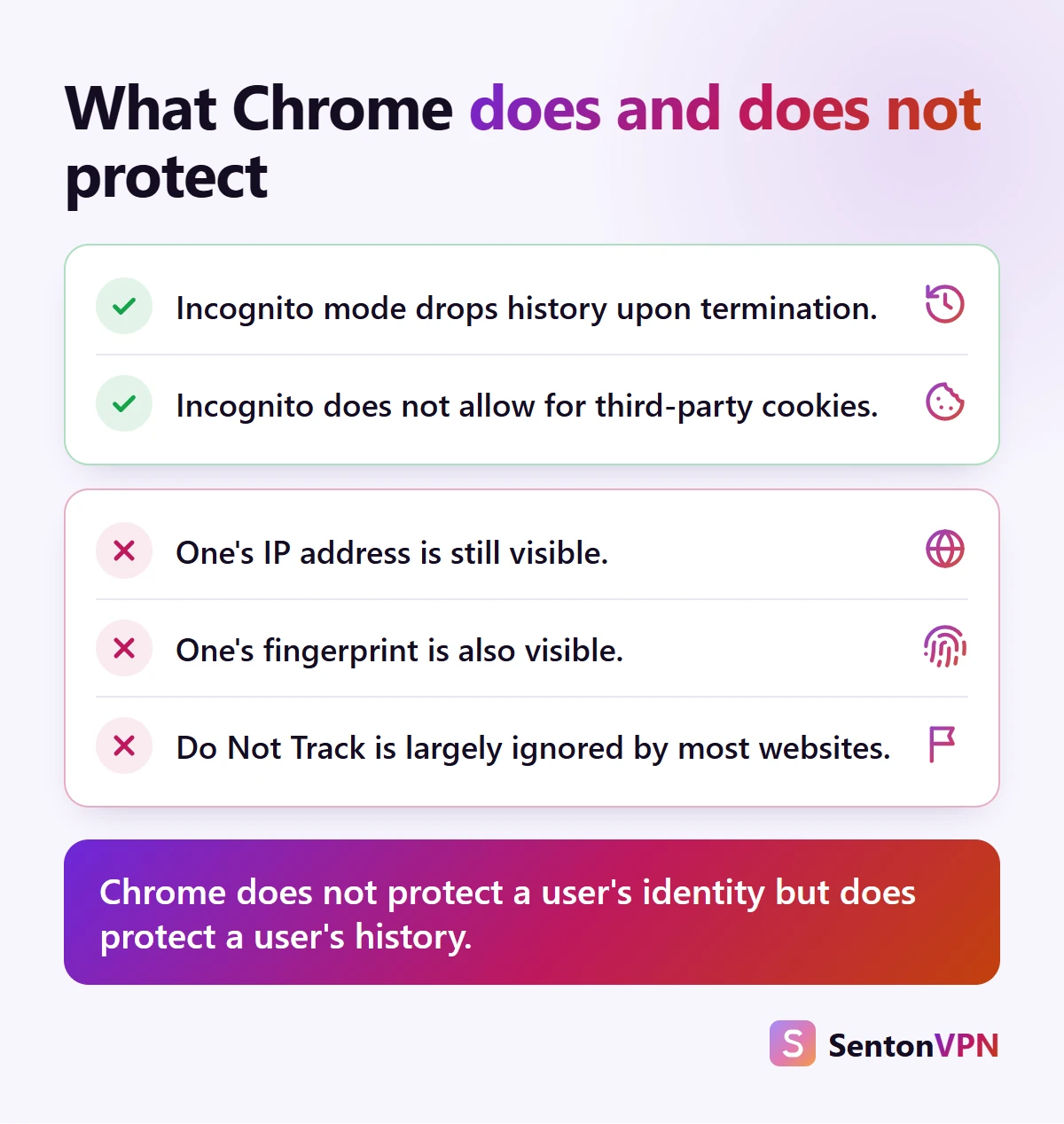
To a limited extent. Chrome does not have any anti-fingerprinting options. Chrome's help page regarding Incognito mode makes no reference to fingerprinting whatsoever. Please see below what Chrome does and does not do regarding anti-fingerprinting.
What Chrome does
- Chrome prevents third-party cookie usage in Incognito
- Site data and history are discarded at the end of an Incognito session
- Chrome also provides a reduced user agent string as compared to previous versions
What Chrome does not do
- Chrome does not have an option to block or obfuscate any fingerprinting scripts. Consequently, many of the scripts that gather information about a user's device will operate as they would on the sites that the user visits
- Chrome's help page notes that Incognito usage can still be observed by your school, employer, internet service provider, website etc.
- The Do Not Track feature is currently disregarded by the majority of sites, including Google itself, as noted by Chrome's help page
Chrome vs other browsers on fingerprinting
Chrome
Chrome has some limited anti-fingerprinting features such as a minimized user agent string, but it does not have any comprehensive anti-fingerprinting. There is also no option within Chrome to enable any anti-fingerprinting.
Brave
Brave (which is based on Chromium) randomises per-site and per-session values by default.
Firefox
Firefox has implemented blocking for known fingerprinting services by default.
Safari
Safari adds noise to some attributes and reports others as fixed values, and the highest level of protection is available in private mode.
Tor Browser
In Tor Browser all users appear identical, and this is enabled by default.
If you are a Chrome user looking for protection however, Brave is the closest alternative. Brave is based on the same Chromium engine as Chrome which means most Chrome extensions are available via the Chrome Web Store.
How to reduce Chrome fingerprinting
- 1Keep Chrome updatedUp to date browsers currently appear most commonly, so an up to date browser will blend in with the general population.
- 2Block third-party cookiesNavigate to Settings > Privacy and security > Third-party cookies. This does not prevent fingerprinting but does prevent the usage of cookies in conjunction with fingerprinting.
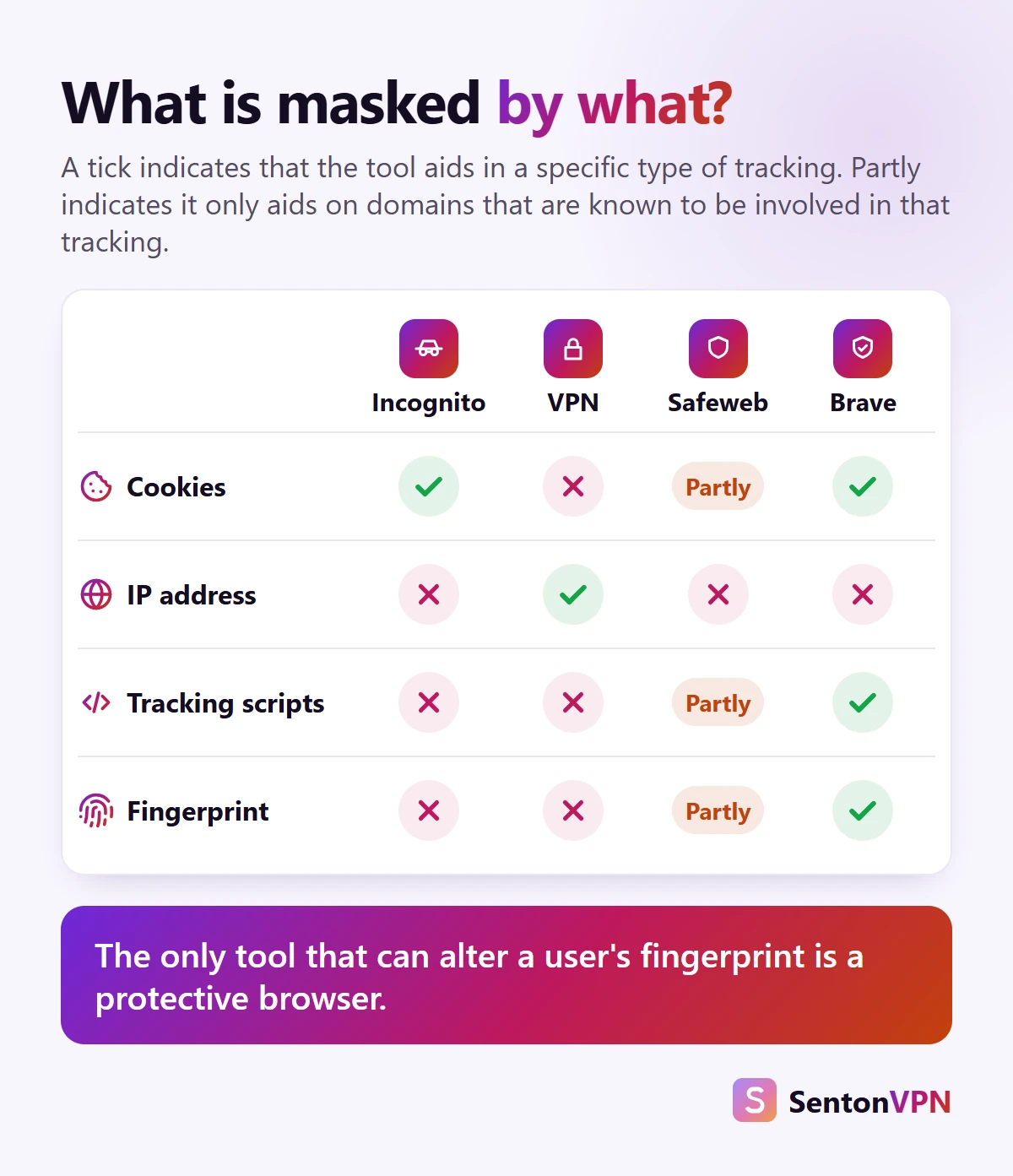
- 3Cut the tracking scriptsA tracker blocker, or Safeweb in Senton's Chrome extension, blocks requests to known tracking domains. This does block some tracking however it does not block passive fingerprinting. Passive fingerprinting involves gathering information sent by the user's browser with each request.
- 4Keep extensions fewUncommon add-ons make a browser less common. Remove unused add-ons.
- 5Separate your identitiesUtilise different Chrome profiles for work, personal and shopping. Log out of accounts that are not required, as a login is more likely to identify a user than any fingerprint.
- 6Switch browsers for sensitive tasksFor native fingerprinting protection use Brave, Firefox or Tor, and use Chrome for general websites.
- 7Test the resultBefore and after a change, run the free Cover Your Tracks tool from the Electronic Frontier Foundation to determine any change in uniqueness.

Can a VPN stop Chrome fingerprinting?
No. And it is important to explain why. A VPN will give you a new IP address (replacing yours) and encrypt all outgoing data. An individual's IP address may be used as part of a fingerprint. Masking an individual's IP address provides limited benefits. However, other fingerprinting information (e.g. headers sent by the user's browser, screen size, graphics and fonts) will remain unchanged when using a VPN.
- The Senton VPN Chrome extension alters the IP address and country associated with your browser when visiting websites
- Safeweb blocks known malicious, advertising and tracking domains when you are using Chrome, so fingerprinting scripts loaded from these domains will not load
- Neither alters a user's fingerprint however, so the browser steps described above still matter

Is Chrome fingerprinting legal?
In the UK, the Information Commissioner's Office requires businesses to offer users meaningful choices prior to the use of fingerprinting. In some cases consent is also required. This position is also taken by regulators across Europe. There is no single federal privacy law in the USA that covers all businesses. There is, however, oversight for tracking. The Federal Trade Commission can act against unfair or deceptive tracking. COPPA protects persistent identifiers used to identify children under the age of 13 across websites. Some state laws, like California's, consider persistent identifiers as personal information.
The bottom line
- Fingerprinting is now allowed across Google's advertising services, and there is no option provided within Chrome to prevent this
- A VPN or Incognito mode obscures some aspects, however they do not prevent fingerprinting
- The main factors that do help are a secure browser for sensitive activities, fewer extensions and fewer scripts in total